-
How to Add Social Proof to Your Website Using Google Reviews and Social Media

People rarely make a purchase or contact a business based only on what the company says about itself. Before making a decision, they often want to know what other customers think, how people are using the product, and whether the business looks active and trustworthy.
That is where social proof helps.
Google Reviews and social media content are two practical sources of social proof you can add to a website. Reviews show what customers say about their experience, while social posts can show real products, customer mentions, photos, videos, and ongoing activity around a brand.
The important part is how you display this content. Filling every page with reviews and social posts can make a website distracting rather than convincing. Social proof works better when it appears naturally at points where visitors are making decisions.
What Is Social Proof on a Website?
Social proof is evidence that other people have already interacted with, purchased from, or had an experience with a business.
On a website, it can take several forms:
- Google Reviews from customers
- Customer testimonials
- Instagram photos and videos
- User-generated content
- Social media mentions
- Facebook posts
- YouTube videos or Shorts
- Ratings and review badges
- Customer photos featuring a product
- Social media hashtag feeds
Imagine someone visiting a local hotel website. The hotel can describe its rooms as clean and comfortable, but recent reviews from guests talking about room cleanliness, staff behavior, and location provide a different type of information.
The same applies to an online store. Product descriptions tell shoppers what a product is supposed to do. Customer reviews and Instagram posts can show what buyers actually experienced.
Why Google Reviews and Social Media Work Well Together
Google Reviews and social media content serve different purposes.
Google Reviews are mainly about customer experience. They can help visitors understand how previous customers felt about a business, product, or service.
Social media is more visual and current. It can show how people use a product, what is happening around a brand, and what customers are sharing publicly.
Consider a restaurant website.
A Google Reviews section might contain comments about the food, service, atmosphere, or waiting time. An Instagram feed might show customer photos, new dishes, events, and recent posts from the restaurant.
Together, they give visitors a broader picture than either source would provide alone.
However, more content does not automatically mean more trust. The content still needs to be relevant, authentic, and placed where visitors can actually use it.
How to Add Google Reviews to Your Website
One of the easiest ways to use customer feedback as social proof is to display Google Reviews directly on relevant website pages.
There are several ways to approach this.
1. Select Reviews That Are Relevant to the Page
Do not choose reviews only because they are positive.
Look for reviews that answer questions potential customers might genuinely have.
For example, a hotel could highlight reviews discussing:
- Room cleanliness
- Location
- Staff
- Check-in experience
- Breakfast
- Facilities
A software company might instead focus on reviews mentioning ease of use, customer support, setup, or specific features.
Relevance makes the review useful rather than decorative.
2. Use a Google Reviews Widget
Manually copying individual reviews can become difficult to maintain, especially when new reviews arrive regularly.
A Google Reviews widget provides another option. Depending on the tool you use, a review widget may collect reviews from a Google Business Profile and display them in a customizable section on your website.
This approach can be useful for businesses that want their review section to stay relatively current without manually updating every review.
Before choosing a widget, check what control it gives you over layout, moderation, mobile responsiveness, loading behavior, and review updates.
3. Choose a Layout That Matches the Page
Reviews should be easy to scan.
Common layouts include:
- Review cards: Useful when you want to show several reviews in a grid.
- Carousel: Suitable when page space is limited and you want visitors to browse multiple reviews.
- List: Helpful for pages where reviews are an important part of the content.
- Review badge: A compact option for areas such as a homepage header, service page, or near a call-to-action.
There is no single layout that works for every website. Choose one based on how important reviews are to that particular page.
4. Keep Important Review Information Visible
A review becomes less useful if visitors cannot understand where it came from.
Where appropriate and permitted by the platform and your implementation, retain useful context such as the reviewer name, rating, review text, date, and source attribution.
Avoid editing a review in a way that changes its meaning. If you shorten a long review for design reasons, make sure the shortened version does not misrepresent what the customer said.
How to Use Social Media as Social Proof
Social media provides a different type of evidence.
Instead of only telling visitors what customers think, it can show products being used, events taking place, customers mentioning a business, or a brand actively communicating with its audience.
1. Display an Instagram Feed
Instagram works particularly well for visually driven businesses.
For example:
- Fashion stores can show customer outfits.
- Restaurants can display food photos.
- Hotels can feature guest experiences and property images.
- Fitness brands can showcase community posts.
- Event businesses can display photos and videos from previous events.
You can embed your Instagram posts or, depending on the collection method and permissions involved, curate relevant customer-generated content.
A small, focused feed is usually more useful than displaying a large wall of unrelated posts.
2. Use Customer-Generated Content
User-generated content can be particularly useful because the content comes from customers rather than the business itself.
Suppose a skincare company has customers posting photos of its products on Instagram. Relevant customer posts could be displayed on product or campaign pages to give visitors additional context about how people use the products.
Permission and usage rights matter here. A public post being visible on social media does not automatically mean every business can reuse it however it wants. Check the platform’s rules and obtain appropriate permission when required.
3. Show Social Media Mentions
Customers sometimes mention a brand without posting directly on the company’s account.
These mentions can include product experiences, event photos, recommendations, questions, or feedback.
Relevant public mentions can add useful context to a website, particularly when they are closely connected to the page where they appear.
For example, an event organizer could create a social wall containing selected posts from attendees. Someone considering the next event can then see what the previous event looked like from an attendee’s perspective.
4. Display a Hashtag Feed
A branded or campaign hashtag can help bring related social posts together.
A hashtag feed can work well for:
- Events
- Product launches
- Marketing campaigns
- Contests
- Conferences
- Community projects
- Seasonal campaigns
Moderation is important. Public hashtags can attract irrelevant or inappropriate posts, so content should be reviewed or filtered before appearing on a business website.
5. Embed Video Content
Social proof does not have to be text or photos. YouTube videos, Shorts, Instagram Reels, and other social videos can demonstrate a product, show a customer experience, or provide a more detailed testimonial.
For products that require explanation, a customer demonstration can sometimes provide information that a short written review cannot.
Where Should You Place Social Proof on Your Website?
Placement matters almost as much as the content itself. Instead of putting every review and social feed on the homepage, think about the questions visitors have on each page.
Homepage
Use a small selection of your strongest and most representative social proof.
This could include a review section, rating summary, customer photos, or a small social feed.
The goal is to establish credibility without turning the homepage into a review directory.
Product Pages
Show proof connected to the specific product.
Useful content might include:
- Product reviews
- Customer photos
- Instagram posts featuring the product
- Video demonstrations
- Customer questions and experiences
Product-specific proof is usually more useful here than general company reviews.
Service Pages
Service businesses can use reviews that mention the particular service being described.
For example, a digital agency’s web design page could feature feedback from web design clients instead of unrelated comments about another service.
Pricing Pages
Pricing is often where visitors become more cautious. A short testimonial or relevant review near pricing information can provide additional context while visitors compare their options. Keep it subtle; too many promotional elements around pricing can have the opposite effect.
Contact or Booking Pages
A small review section, rating display, or testimonial near a contact or booking form can reassure visitors without distracting them from completing the action.
Combining Google Reviews and Social Media on One Website
A social proof section could combine several types of content, such as Google Reviews, Instagram posts, customer photos, and video testimonials.
The key is organization.
For example, an ecommerce homepage might contain a small Google Reviews section near the middle of the page and a customer Instagram gallery closer to the bottom.
A hotel could display Google Reviews on its booking page while showing an Instagram gallery on its homepage or accommodation pages.
The source should match the visitor’s question.
If someone wants to know whether a service is reliable, reviews may be more useful. If someone wants to see what a venue or product looks like in everyday use, social photos and videos may provide better context.
How to Add Social Proof Without Coding
Social media aggregation and review widget tools can collect supported content and provide an embed code that you add to your website.
The general process looks like this:
- Choose the source, such as Google Reviews, Instagram, Facebook, YouTube, or another supported social network.
- Connect or add the appropriate account, profile, page, hashtag, or other supported source.
- Review and moderate the collected content.
- Customize the widget’s layout and appearance.
- Generate the embed code.
- Paste the code into the appropriate section of your website.
The exact steps depend on the tool, social platform, and website builder you use.
WordPress, Shopify, Wix, Squarespace, Webflow, and other website platforms also handle custom embed code differently, so check the instructions for your particular setup.
Best Practices for Using Social Proof
Good social proof should help visitors make a decision, not simply make a page look busy.
- Keep it relevant: A review about customer support may work well on a service page, while a product photo makes more sense on a product page.
- Use recent content where possible: A website showing only very old reviews or social posts may leave visitors wondering whether the business is still active.
- Do not hide every negative opinion: A page filled exclusively with perfect comments can sometimes look overly curated. Genuine feedback is naturally varied.
- Moderate social feeds: Automated feeds should still be monitored for spam, irrelevant posts, duplicate content, or material you do not want appearing on the website.
- Think about page speed: Review widgets, Instagram feeds, videos, and other external content can add scripts and media to a page. Test loading performance, especially on mobile.
- Check mobile layouts: A five-column social wall might look fine on a desktop and become difficult to use on a phone.
- Preserve authenticity: Do not rewrite customer comments to make them sound better. If editing or shortening is necessary, avoid changing the original meaning.
Common Mistakes to Avoid
Social proof can help visitors feel more confident, but too much of it can have the opposite effect. Keep these common mistakes in mind when adding reviews and social content to your website.
- Avoid Overload: You do not need testimonials, review carousels, social walls, and videos all over the same page. Too much social proof can distract visitors from the information they actually came to find.
- Keep It Relevant: A five-star review about your overall business may not help someone deciding whether to buy a specific product. Show reviews and customer content that relate to the page and the questions visitors may have.
- Moderate Feeds: Automatic social feeds still need occasional checking. Without moderation, an unrelated hashtag post or unwanted mention could end up appearing on your website.
- Keep Information: Social proof should support your website content, not replace it. Visitors still need clear product details, pricing, service information, policies, and contact details to make a decision.
A Simple Social Proof Setup for a Business Website
You do not need an elaborate setup to get started. A local service business, for example, could use a Google rating or a few recent reviews on the homepage, service-specific reviews on important service pages, and a small Instagram feed showing recent work.
An ecommerce store could use customer reviews on product pages, customer Instagram photos near product galleries, and selected video content for products that benefit from demonstrations.
Start with the pages where visitors are closest to making a decision. Add proof that answers the questions they are likely to have at that moment.
Final Thoughts
Adding social proof to a website is not about collecting as many reviews and social posts as possible. It is about showing the right evidence in the right place.
Google Reviews can help visitors understand what previous customers experienced. Social media can show products, customers, events, and brand activity in a more visual and current way.
Used together, they can give visitors a fuller picture of a business.
Keep the content authentic, relevant, reasonably current, and easy to browse. Moderate what appears on your website, respect content permissions, and pay attention to page speed and mobile usability.
When social proof genuinely helps visitors answer questions and evaluate a business, it becomes a useful part of the website rather than just another marketing element.
-
Display Customer Reviews to Your Website: 12 Best Practices

Customer reviews have become one of the most influential forms of social proof online. Before making a purchase, booking a service, or signing up for a product, people often look for evidence that others have had a good experience with the brand. That makes it important for businesses to display customer reviews where potential customers can easily see them.
That is why businesses increasingly embed customer reviews directly on their websites instead of sending visitors to third-party platforms to find them.
But adding reviews to a website is not simply about displaying a few five-star ratings. The way reviews are collected, displayed, updated, and integrated into the website can have a major impact on trust, user experience, page performance, and conversions.
So, what actually matters when you display customer reviews on your website?
1. Authenticity Should Come First
The first and most important factor is authenticity.
Visitors want to know that the reviews they see when you display customer reviews on your website come from real customers. A beautifully designed review section means very little if users don’t trust the content.
Whenever possible, display reviews from recognizable and credible platforms such as Google, Facebook, Yelp, or industry-specific review sites. Include useful information such as the reviewer’s name, profile image when available, star rating, date, and original source.
Avoid heavily editing customer reviews just to make them sound more positive. Small formatting adjustments are fine, but changing the meaning of a customer’s words can damage credibility.
Authentic reviews, even those that aren’t perfectly written, often feel more trustworthy than overly polished testimonials.
2. Choose the Right Reviews for Your Audience
More reviews don’t necessarily mean more trust.
Instead of displaying every review you have, think about which feedback is most relevant to the visitor’s decision.
For example, an ecommerce store selling running shoes might highlight reviews that mention comfort, durability, sizing, and performance. A SaaS company might prioritize reviews discussing ease of use, customer support, integrations, and measurable results.
Relevance matters because visitors typically want answers to specific questions before taking action.
You can also organize reviews based on products, services, locations, ratings, or topics. This makes it easier for users to find the feedback that matters to them.
3. Keep Reviews Fresh and Updated
One of the biggest problems with manually embedding reviews is that the content can quickly become outdated.
Imagine a visitor landing on your website and seeing reviews from three years ago. Even if those reviews are positive, they may not provide much confidence about your current product or service.
Fresh reviews show that customers are still interacting with your business.
If you’re using a review widget or integration, look for a solution that can automatically synchronize new reviews from the original platform. This eliminates the need to repeatedly copy and paste new testimonials onto your website.
Regularly updated content can also make your review section feel active rather than abandoned.
4. Don’t Sacrifice Page Speed
This is particularly important for developers.
Customer reviews may contain images, profile pictures, external scripts, ratings, and other dynamic elements. If they’re implemented poorly, these elements can increase page load time and affect the overall user experience.
A review widget should ideally be lightweight and optimized for performance.
Consider factors such as:
- JavaScript and CSS usage
- Image optimization
- Lazy loading
- Number of reviews loaded initially
- Third-party requests
- Mobile performance
You don’t necessarily need to display dozens of reviews at once. Showing a few relevant reviews initially and allowing visitors to load more can create a better balance between social proof and performance.
A review widget should support your website—not slow it down.
5. Make the Design Match Your Website
A review section should feel like part of your website rather than something that has been pasted into it.
This is where customization becomes important.
Pay attention to fonts, colors, spacing, card layouts, button styles, and responsive behavior. Your review section should complement the rest of the page.
For example, a minimalist website might benefit from a clean horizontal review layout, while an ecommerce website could use cards with product-specific ratings and customer photos.
The goal isn’t to make reviews flashy. The goal is to make them easy to read while maintaining a consistent brand experience.
6. Make Reviews Easy to Scan
Most website visitors don’t read every review word for word.
They scan.
That means your review section should make important information immediately visible.
Star ratings, reviewer names, short excerpts, dates, and review counts can help users quickly understand the overall sentiment.
Consider using:
4.8 ★★★★★ based on 1,200+ reviews
followed by a few detailed customer comments.
This gives visitors an immediate overview while allowing them to explore individual experiences if they want more information.
Avoid huge blocks of text. If you have long reviews, use expandable sections or “Read more” options.
7. Optimize for Mobile
A review widget that looks great on desktop can easily become difficult to use on mobile.
Since a significant portion of website traffic comes from smartphones, responsive design should be a priority.
Check whether:
- Review cards fit smaller screens
- Text remains readable
- Images resize correctly
- Horizontal scrolling works properly
- Buttons are easy to tap
- The widget doesn’t interfere with other page elements
Test the review section on multiple screen sizes before publishing it.
A mobile visitor should be able to understand your reviews without zooming, excessive scrolling, or struggling with a broken layout.
8. Give Visitors Enough Context
A five-star rating by itself doesn’t always tell the whole story.
Context can make reviews much more persuasive.
For example:
★★★★★
“The setup took less than 10 minutes and our team was able to start using it immediately.”This provides more useful information than simply displaying:
★★★★★ Great product!
When possible, show the product or service associated with the review. Customer photos, verified purchase indicators, location information, or review dates can also add context provided the information is legitimately available and appropriately displayed.
9. Don’t Hide Negative Reviews Completely
It may seem tempting to display only five-star reviews.
However, showing a balanced collection of feedback can sometimes increase credibility.
A website filled exclusively with perfect reviews may look less authentic to skeptical visitors.
That doesn’t mean you need to prominently showcase every negative comment. Instead, focus on transparency and make sure your review selection isn’t misleading.
If you receive negative feedback, use it as an opportunity to demonstrate how your business responds. A thoughtful response to a customer complaint can sometimes communicate more about your company than a perfect rating.
10. Think About Where You Place Reviews
Where you display customer reviews on your website can directly influence how useful they are. Instead of placing all your reviews at the bottom of the homepage, consider the moments when visitors need reassurance before taking action. For an ecommerce website, reviews can be placed near product descriptions, pricing, or add-to-cart buttons, where shoppers are evaluating whether a product is worth buying. For a SaaS website, testimonials can work well near signup forms, pricing plans, or feature sections where potential customers are comparing solutions.
The key is to place reviews close to the decision-making point without making the page feel cluttered. A local business could display reviews near booking forms, service details, or contact information, while a service-based business might place relevant testimonials alongside case studies or inquiry CTAs. You can also match specific reviews to the page or product a visitor is viewing, making the social proof more relevant. When reviews appear at the right stage of the customer journey, they can address doubts, reinforce credibility, and make it easier for visitors to take the next step.
11. Consider SEO Without Overdoing It
Customer reviews can also contribute useful, user-generated content to a webpage.
However, don’t add reviews purely because you want more keywords.
The primary goal should always be helping visitors make informed decisions.
Use descriptive headings, accessible markup, meaningful review content, and structured data where appropriate and compliant with search-engine guidelines.
Most importantly, make sure the reviews are genuinely visible to users and aren’t being added solely for search engines.
12. Measure Whether Reviews Are Actually Working
Finally, don’t assume that adding reviews automatically improves conversions.
Track what happens after implementation.
Depending on your website, you might measure:
- Conversion rate
- Product purchases
- Signup rate
- Booking completions
- CTA clicks
- Time spent on important pages
- Engagement with the review section
You can even test different review formats and placements.
For example, compare a traditional review carousel with a grid of customer testimonials. Or test reviews near the CTA versus reviews further down the page.
The goal is to understand which type of social proof actually helps your audience take action.
Final Thoughts
Google Reviews can help new brands build trust, credibility, and social proof by showing real customer experiences. However, simply adding a review widget isn’t enough; reviews should be authentic, recent, relevant, mobile-friendly, and well-placed.
The goal is to use reviews where they can reduce customer hesitation and support purchase decisions without distracting from the user experience. Ultimately, Google Reviews should be part of a broader trust-building strategy that helps first-time visitors feel more confident about choosing the brand.
-
Trustpilot VS Google Reviews: Which Review Platform Builds More Customer Trust?

Choosing between Trustpilot and Google Reviews isn’t just a formatting decision, it shapes how much a stranger trusts your business before they ever talk to your sales team. Nearly 96% of consumers read reviews before making a purchase, and most don’t stop at one source: nearly 60% check two or three review sites before deciding, and only about 14% rely on a single platform. So the real question isn’t “Trustpilot or Google Reviews” it’s which platform carries more weight at which stage of the buying journey, and how to use both without spreading your review strategy too thin.
This guide breaks down Trustpilot VS Google Reviews across trust, SEO, cost, and conversion impact, so you can decide where to focus and how to showcase customer reviews you collect directly on your website using a tool like Tagembed’s review widget.
Key Takeaways
- Google Reviews wins on local search visibility and is a confirmed local SEO ranking factor; Trustpilot has minimal direct SEO impact but stronger on-site and branded-search trust signals.
- A 2025 Trustpilot and London Research study found ads featuring Trustpilot star ratings earned 57% higher click-through rates than identical ads using Google ratings.
- Google Reviews are completely free with no collection limits; Trustpilot’s meaningful features (automation, analytics) typically require a paid plan starting around $250+/month.
- The strongest strategy for most businesses is running both: Google Reviews for local discovery, Trustpilot (or a testimonial widget) for on-site conversion, then embedding both on your website for maximum visibility.
What Is Trustpilot and How Does It Work?
Trustpilot is an independent, open review platform founded in Denmark in 2007 where any consumer can leave a review for any business, whether or not that business has claimed its profile. Businesses can claim their Trustpilot page to respond to reviews, request verified feedback, and access analytics, but claiming and managing a profile at scale typically requires a paid subscription.
Trustpilot’s Reach and Verification Model
Trustpilot now hosts over 300 million reviews across more than one million businesses, with especially strong adoption in the UK and Nordic countries, where shoppers routinely check Trustpilot before buying. Its verification tools are designed to filter out reviews from people who never interacted with the business, which is part of why some buyers see Trustpilot as more credible in categories where trust is hard to earn, such as finance, SaaS, and e-commerce.
What Is Google Reviews and How Does It Work?
Google Reviews are reviews attached directly to a business’s free Google Business Profile. They appear in Google Search, Google Maps, and local pack results meaning a customer can see your star rating before they even click through to your website.
Google Reviews and Local Search Visibility
Google Reviews function as a direct local SEO ranking signal: businesses with more recent, higher-rated reviews tend to perform better in Google’s local pack and Maps results. This makes Google Reviews especially powerful for service businesses like plumbers, dentists, salons, and restaurants, where high star ratings in search results translate directly to more clicks and calls. Businesses can also use a Google review widget to display their customer reviews on their website, helping visitors see social proof before contacting the business.
Trustpilot VS Google Reviews: Head-to-Head Comparison
Factor Trustpilot Google Reviews Cost Free tier limited; paid plans start around $250+/month for full features Completely free, no collection limits SEO impact Minimal direct ranking impact Confirmed local SEO ranking factor Best for E-commerce, SaaS, finance, brand trust pages Local businesses, service providers, Maps visibility Review collection Automated invitations on paid plans Manual requests or third-party tools Where it’s seen Business website, branded search, Google Shopping ads Search results, Google Maps, Business Profile Perceived authenticity Verified-review process seen as more rigorous Open to anyone with a Gmail account Which Review Platform Builds More Customer Trust?
Trust in E-Commerce and High-Consideration Purchases
For high-stakes or considered purchases, software subscriptions, financial products, big-ticket e-commerce — Trustpilot’s verification process often reads as more rigorous, since anyone with a Gmail account can leave a Google review with no purchase verification required. This gap in perceived rigor matters most in categories where fake reviews have been widely reported, such as home services and finance.
Trust in Local and Service-Based Search
For local searches — “plumber near me,” “best dentist in [city]” — Google Reviews win almost by default, because they’re familiar, immediately visible in search results, and don’t require a buyer to leave Google to verify a business’s reputation. Consumers doing a local search default to trusting Google Reviews simply because those ratings are already in front of them.
The Advertising and Conversion Angle
Trustpilot ratings appear to influence ad performance more than Google ratings do at equal star levels. A July 2025 study by Trustpilot and London Research found that ads featuring Trustpilot stars drove 57% higher click-through rates than the same ads using Google ratings, even when both showed identical star counts and review volumes. Separately, one furniture retailer reported a 22% increase in ad click-through rate after integrating Trustpilot’s seller ratings into Google Shopping campaigns.
Trustpilot VS Google Reviews for SEO
If local search visibility is your priority, Google Reviews are the clear winner. they’re built directly into the ranking signals Google uses for Maps and local pack results. Trustpilot reviews, by contrast, live on Trustpilot’s domain rather than your own, so they don’t feed your local SEO the same way, even though they can still build trust once a buyer lands on your website or sees your reviews referenced elsewhere.
Why a Single Platform Rarely Covers Both Goals
More than 65% of consumers rarely or never trust reviews posted only on a company’s own website, and most buyers actively cross-check two or three review sources before deciding. That means neither Google Reviews nor Trustpilot alone is enough, buyers want to see consistency across multiple platforms, not just a polished single source.
Cost Comparison: Trustpilot VS Google Reviews Pricing
Google Reviews are free in every meaningful sense: no cost to collect, no cost to reply, no tier restrictions on basic functionality, and the Business Profile dashboard comes included with any verified Google listing. Trustpilot operates on a freemium model. The free tier includes 100 invitation credits per month and basic features, but automated review invitations, deeper analytics, and full response management require a paid subscription that commonly starts around $250 per month and scales with business size.
Is Trustpilot Worth Paying For?
For most small and mid-sized e-commerce businesses, paying $250+/month for Trustpilot while also investing effort into Google Reviews is unnecessary overlap. Trustpilot earns its cost primarily for brands competing on trust in crowded, considered-purchase categories — SaaS, finance, and larger e-commerce operations — where the on-site conversion lift and Google Shopping integration justify the spend.
How to Choose Between Trustpilot and Google Reviews for Your Business
The right choice depends on where your buyers look for proof, a local business gains more from a free, search-visible Google profile, while brands in high-consideration categories often benefit from Trustpilot’s added credibility.
Choose Google Reviews First If:
- You run a local or service-based business (restaurants, clinics, home services, agencies).
- Local search and Maps visibility drive most of your new customer inquiries.
- You want a free, no-friction way to start collecting social proof today.
Add Trustpilot If:
- You sell in a high-consideration category like SaaS, finance, or larger e-commerce.
- You run paid ads and want to test star-rating integrations for CTR lift.
- Your buyers actively compare vendors on dedicated review sites before purchasing.
The Smartest Move: Use Both, and Display Both
Since most consumers check multiple review sources anyway, the strongest reputation strategy usually isn’t “Trustpilot VS Google Reviews”, it’s collecting on whichever platform fits your category, then bringing both feeds onto your own website where every visitor can see them without leaving your site. See how to embed Google Reviews and Trustpilot widgets together, so your homepage, pricing page, and checkout flow all carry the same trust signal simultaneously.
Best Practices for Displaying Reviews on Your Website
Placement That Actually Converts
Put review widgets where buyers hesitate: pricing pages, checkout pages, and product pages, not just a buried “testimonials” page. Reviews near the point of decision do more to reduce purchase anxiety than reviews a visitor has to go looking for.
Keep Both Feeds Fresh and Verified
A stale review widget, one still showing reviews from two years ago, can hurt trust more than having no widget at all. Choose a review embed tool that automatically syncs new reviews from Google and Trustpilot, so your site never looks out of date.
Final Thoughts
There’s no single winner in the Trustpilot VS Google Reviews debate, each platform builds trust differently, for different buyers, at different points in the journey. Google Reviews win on reach, cost, and local SEO. Trustpilot wins on perceived rigor and ad performance in high-consideration categories. The businesses that build the most customer trust aren’t the ones that pick a side, they’re the ones that collect reviews on the platform that fits their category, then make sure every visitor sees that proof the moment they land on the website.
Frequently Asked Questions
1. Is Trustpilot or Google Reviews more trusted by consumers?
It depends on the category and the buying stage. Google Reviews tend to win for local and service-based searches because they appear directly in search and Maps. Trustpilot tends to carry more weight for e-commerce, SaaS, and financial services, where buyers are actively comparing vendors on a dedicated review destination.
2. Can I display both Trustpilot and Google Reviews on the same website?
Yes. Most modern review widget tools, including Tagembed, support pulling in reviews from multiple platforms — including Google, Trustpilot, Facebook, and others — and displaying them together in a single widget or side by side.
3. Does Trustpilot help with SEO the way Google Reviews does?
No. Google Reviews are a confirmed local SEO ranking factor tied to your Business Profile. Trustpilot reviews live on Trustpilot’s domain and don’t directly influence your Google Maps or local pack rankings, though they can still support on-site conversion and brand trust.
4. Can I remove a negative review on Trustpilot or Google?
Only if the review violates the platform’s policies — for example, it’s fake, abusive, or from someone who was never a customer. Genuine negative reviews generally cannot be removed just because they’re unflattering; both platforms allow businesses to respond publicly instead.
-
How Customer Reviews Can Build Trust on Your Website

When someone visits your website for the first time, they don’t know you. They haven’t worked with you before, nobody they trust has vouched for you, and the only thing they really have to go on is what other customers have said. That’s why customer trust matters so much right now. People are buying from businesses they’ve never met in person, so they’re relying almost entirely on what they can see online.
This is where reviews come in. A review isn’t just a star rating, it’s proof from a real person that your product or service actually does what you say it does. People naturally look at what others are doing before making a decision, especially when they’re not sure. If someone sees a good number of positive reviews, they feel more comfortable buying.
That’s also why it matters to show customer reviews on your own website, not just leave them sitting on Google or Yelp. If a customer has to go dig through another site to find proof you’re trustworthy, most won’t bother. Put that feedback right on your homepage, product pages, or checkout page instead, and you’re building trust exactly where people are deciding whether to buy.
How Customer Reviews Build Trust
Here’s what reviews actually do for you:
- Show real customer experiences. Reviews let people see what it’s really like to use your product or work with you, not just what your marketing says.
- Increase credibility. When real customers speak up for your brand, it carries a lot more weight than anything you say about yourself.
- Reduce purchase hesitation. Most people hesitate because they’re unsure. Reviews quietly answer the question “will this work for me?” before they even ask it out loud.
- Help visitors make decisions. A detailed review that talks about a specific use case, or the pros and cons, works a lot like a friend’s recommendation. It helps people compare and decide faster.
All of this adds up to more than just a nicer looking website. It actually changes whether someone converts into a paying customer.
Popular Review Widgets for Your Website
Once you know why reviews matter, the next question is where to pull them from. Review widgets grab feedback from platforms people already trust and show it right on your site.
Google Review Widget
Display Google Review widget on website from your Google Business Profile directly. By showcasing real customer experiences where visitors can see them, it helps build trust and encourages potential customers to take action.
Facebook Review Widget
A business use Facebook Review widget shows recommendations and reviews. This works well if you have an active community on Facebook, since people tend to trust recommendations shared through social platforms.
Yelp Review Widget
A Yelp Review widget works well for local businesses. Adding Yelp reviews to your site helps reassure nearby customers that others in the area have had a good experience with you.
Tripadvisor Review Widget
For hotels, restaurants, and travel businesses, a Tripadvisor Review widget shows traveler reviews so potential guests can picture their own trip before booking.
Airbnb & Booking.com Review Widgets
These widgets show guest experiences and accommodation reviews. They’re especially useful for vacation rentals, boutique hotels, and short term stays, where trust plays a big part before someone commits to booking.
Amazon Review Widget
An Amazon Review widget pulls product reviews and ratings from your Amazon listings so shoppers researching your product on your own site can see the same proof.
G2 & Capterra Review Widgets
For SaaS and software companies, G2 and Capterra reviews are some of the strongest trust signals you can have. B2B buyers often check these platforms specifically before making a decision, so showing that feedback builds credibility right where technical buyers are already comparing options.
Where Should You Display Review Widgets?
Where you place reviews matters just as much as having them. For the best results, add review widgets to:
- Homepage, to build trust as soon as someone lands on your site
- Product or service pages, to ease hesitation while people are researching
- Landing pages, to back up your campaign messaging with real proof
- Pricing pages, to justify the cost and reduce last minute doubt
- Contact pages, to reassure leads before they reach out
Placing reviews on these high intent pages means social proof shows up right when people are deciding whether to trust you.
How to Add Review Widgets to Your Website
Adding a review widget usually comes down to a few simple steps:
- Choose a review source. Decide which platforms, like Google, Yelp, Facebook, or G2, best represent your customer feedback.
- Select a widget layout. Pick a format such as a carousel, grid, list, or popup that fits your site.
- Customize the design. Match the colors, fonts, and spacing to your brand so it looks like it belongs.
- Moderate reviews. Filter, highlight, or hide certain reviews to control what visitors actually see.
- Copy and paste the embed code. Add the code snippet to your website. No development work needed.
Best Practices for Displaying Reviews
To get the most out of your reviews, keep these in mind:
- Use authentic reviews. Never fake or edit them. Authenticity is the whole reason social proof works in the first place.
- Keep reviews updated. Old, stale reviews can make people wonder if your business is even still active.
- Make widgets mobile friendly. Most of your traffic is probably coming from phones, so the widget needs to work well on smaller screens.
- Place reviews near CTAs. Putting reviews close to buttons like “Buy Now” or “Book Now” reinforces confidence right when someone’s about to act.
- Avoid overcrowding your website. Too many reviews packed onto one page can overwhelm people. Pick a strong, representative selection instead.
How Tagembed Helps Display Reviews
Tagembed makes it simple to turn scattered customer feedback into something that actually builds trust on your site:
- Collect reviews from multiple platforms, including Google, Facebook, Yelp, Tripadvisor, Amazon, G2, Capterra, and more, all in one place.
- Customize widget layouts, choosing from different display styles and matching them to your brand.
- Moderate content, approving, hiding, or highlighting specific reviews to control what visitors see.
- Embed reviews without complex coding. Just copy and paste a code snippet and your widget is live.
By pulling reviews together from every platform your customers use, Tagembed helps you keep a consistent, credible trust signal across your whole website.
Final Thoughts
Customer reviews are one of the most useful tools a website has for building trust, and a lot of businesses still don’t use them well. They turn vague claims into actual proof, ease the hesitation that keeps people from buying, and give your brand credibility that no amount of marketing copy can match on its own. Pick the right review sources, place your widgets where they’ll actually be seen, and stick to good practices around authenticity and design, and your reviews can become one of the strongest things driving conversions on your site.
FAQs
1. What is a review widget?
A review widget is a tool that pulls customer reviews from platforms like Google, Facebook, or Yelp and displays them directly on your website, so visitors don’t have to leave your site to see social proof.
2. How do review widgets build trust?
Review widgets build trust by showing real, verifiable customer feedback somewhere visitors can easily see it, reassuring them that other people have had a good experience with your business.
3. Can I display reviews from multiple platforms?
Yes. Most review widget tools, including Tagembed, let you pull in reviews from multiple sources, such as Google, Facebook, Yelp, Amazon, and G2, and show them all in one widget.
4. Can I add review widgets without coding?
Yes. Most review widget platforms give you a simple embed code you can copy and paste into your website. No technical skills required.
5. Which review widget is best for my website?
It depends on your industry. Google or Facebook widgets work well for most businesses, Yelp and Tripadvisor suit local and travel businesses, Amazon widgets fit product based brands, and G2 or Capterra widgets are the better choice for SaaS and software companies.
-
The Role of Review Aggregators in Influencing Consumer Purchasing Decisions

Consumers’ purchasing decisions have evolved dramatically in today’s day & age. Online reviews have become the go-to source for assessing product or service quality. A staggering 93% of consumers say online reviews impact their purchasing decisions. As we explore the fascinating world of review aggregators for consumers, we’ll uncover how these platforms influence consumer choices and reshape online commerce’s landscape.
The Rise of Review Aggregators For Consumers:
Review aggregators are the central hubs that aggregate, organize, and present reviews from multiple sources on websites.
These platforms streamline the process for potential customers to conveniently access a wealth of opinions. They consolidate scattered information into a single, easily accessible location.
Review aggregators for consumers help them to find and analyze reviews, expediting decision-making.
As a business owner, this means potential customers can access information about your products or services quickly and efficiently, leading to quicker and more informed choices.
The convenience offered by online review aggregators significantly contributes to boosting conversions.
The Power of User Reviews
User reviews serve as genuine and unfiltered testimonials of your products or services. In the eyes of consumers, they hold a level of trust equivalent to personal recommendations.
This sentiment is reinforced by the fact that 85% of consumers trust online reviews as much as they trust advice from friends and family.
Understanding this immense power of user-generated content is the first step in utilizing its potential for your business.
1. Centralized Information
Review aggregators serve as a one-stop shop for consumers seeking information about a product or service.
Instead of visiting multiple websites or sources, users can conveniently find numerous reviews in one place, saving them time and effort in the research process.
This centralized information is precious for busy consumers who want quick access to relevant insights without extensive searches.
2. Trust and Credibility
Review aggregators often employ verification processes to ensure the authenticity of reviews. They may require users to confirm their purchase or experience, helping to reduce the prevalence of fake or biased reviews.
These platforms frequently use standardized rating systems, making it easier for consumers to gauge overall satisfaction with a product or service at a glance. This consistency in rating scales adds to the credibility of the reviews.
3. Comparative Analysis
Review aggregators for consumers commonly offer features that allow users to compare products or services side by side. This function facilitates an in-depth analysis, helping consumers evaluate which option aligns best with their specific needs and preferences.
Comparative analysis can save consumers from opening multiple tabs, switching between websites, or creating complex spreadsheets to weigh their options.
4. Diverse Perspectives
Review aggregators showcase customer reviews with different backgrounds, usage scenarios, and preferences. This diversity allows potential buyers to consider many viewpoints before making a decision.
Consumers can often filter reviews by specific criteria, such as the most recent, most helpful, or highest rated, to find reviews that align with their particular concerns or interests.
Review Aggregators’ Influence on Consumer Purchasing Decisions:

1. Informed Decision-Making
- The comprehensive information available on review aggregators empowers consumers to make well-informed decisions. This is particularly valuable for high-consideration purchases where buyers want to minimize the risk of post-purchase dissatisfaction.
- Users can delve into the specifics of a product or service, from its features and performance to potential drawbacks, enabling them to align their choice with their specific requirements.
2. Validation of Choices
- Positive reviews validate consumers’ inclination to buy a particular product or service. Seeing that others have had positive experiences can boost confidence and reinforce purchasing decisions.
- This validation is especially crucial for consumers who might be on the fence or uncertain about their choices.
3. Mitigation of Risk
- Consumers are more likely to reconsider their decision and explore alternative options when a product or service consistently receives negative reviews. Review aggregators, in this sense, function as risk assessment tools.
- They provide valuable insights into potential issues, allowing consumers to make calculated choices and avoid pitfalls.
4. Consumer Feedback Loop
- When addressed constructively by businesses, negative reviews can lead to product improvements and enhanced customer service. Companies can use these platforms to listen to their customers and demonstrate a commitment to quality.
- The feedback loop established through review aggregators fosters accountability and encourages businesses to adapt and evolve based on customer input.
5. Community Building
- Many consumers actively engage with the reviewer community on these platforms. They ask questions, seek clarification, and share their own experiences. This sense of community adds a social element to the decision-making process.
- Engaging with the community can help users gain valuable insights and advice beyond what’s captured in written reviews, further enhancing their understanding of a product or service.
6. Social Proof
- Consumers seek social proof before purchasing in today’s marketplace. They want assurance that they are making the right choice. This quest for social proof is so potent that 88% of consumers make it a habit to read reviews to determine a business’s quality.
- Review aggregators excel in providing this social proof by presenting diverse opinions in one place, thereby simplifying the decision-making process.
7. Empowering Decision-Making
- Review aggregators empower consumers to make well-informed decisions by consolidating and organizing reviews. The ease of access, coupled with the organized presentation of reviews, simplifies the process of gathering and assessing information about your products or services.
- This increased accessibility and convenience are powerful drivers of conversions, as customers are more likely to convert when they have easy access to the information they need to make a decision.
The Review’s Impact on Businesses:

1. Boosting Reputation and Sales:
Positive reviews, especially when featured on review aggregator platforms, can significantly boost your online reputation. 72% of consumers trust a local business more if it has positive reviews.
This increased trust often leads to higher sales and conversions. Positive reviews enhance your brand’s reputation and encourage potential customers to take the next step, whether it’s making a purchase or contacting your business.
2. Turning Challenges into Opportunities:
When managed effectively, negative reviews can become opportunities for improvement. In today’s interconnected world, handling negative reviews is just as critical as celebrating positive ones.
When approached professionally, negative reviews can be a channel for demonstrating your commitment to customer satisfaction.
By addressing issues raised in negative reviews and implementing necessary improvements, you retain existing customers and win over potential ones.
The Future of Review Aggregators:
1. Emerging Trends:
As technology evolves, so do review aggregators. To stay at the forefront of digital commerce, businesses must keep pace with emerging trends in this field.
The adoption of artificial intelligence, enhanced personalization, and mobile accessibility are just a few trends shaping the future of review aggregators.
2. Shaping the Relationship:
Review aggregators for consumers are poised to play a more substantial role in shaping consumer and business relationships.
Understanding the evolving dynamics in this space will be vital in adapting to the changing digital landscape.
The ability to embrace and use these tools to your advantage will be pivotal in your business’s success in the digital marketplace.
Wrapping Up!
Online review aggregators provide centralized, credible, and diverse information in today’s consumer landscape.
While they empower consumers to make informed decisions and foster transparency and accountability in the marketplace, users should approach them with discernment, considering potential challenges like fake reviews and biases.
Review aggregators are a powerful tool for informed consumer decision-making when used judiciously.
-
The Business Benefits of Review Aggregators: Building Online Reputation

In today’s world, customers have multiple channels and ways to evaluate businesses before making decisions.
Among these channels, existing customer reviews play a crucial role. In that scenario, Review aggregators are the most popular ones where potential customers read reviews from existing clients on the website.
Therefore, it is essential for growing businesses to identify the top review aggregators for their industry, establish a presence, and manage the reviews to improve their online reputation.
This article provides insights into the persuasive benefits of review aggregators and how businesses can effectively tap into them to grow their online reputation.
What Is A Review Aggregator?
The main purpose of review aggregators is to provide a curated and organized list of customer reviews on the website. These customer reviews can be fetched from any customer review platform, such as Google Reviews, Facebook Reviews, Yelp Reviews, etc.
Once you have selected an efficient review aggregator tool, you can easily set up the review-fetching process without manual support. Furthermore, some of these review aggregator tools are well-equipped to customize the review widget. This helps the end customer or visitor to receive a personalized and actionable review widget.
Ways How Review Aggregators Can Benefit Your Business
According to statistics from Luisa Zhou, almost 55% of consumers read at least 4 reviews before purchasing. Another report by Trust Pulse has said that 60% of consumers believe the number of reviews a business has is crucial when deciding whether to use its services.
For that reason, businesses are promptly using review aggregators to bring all the positive reviews into a functional box. Take a look at the benefits you can leverage from review aggregators.
#1. Provide Social Proof
First of all, when it comes to reviews, one of the benefits of them is social proof. As consumers, we often buy or subscribe to something based on others’ positive experiences. That’s where review aggregators come in handy. They offer a curated and organized list of customer reviews from various platforms like Google, Facebook, Yelp, etc.
88% of consumers trust online reviews as much as personal recommendations.
For businesses, review aggregators provide social proof of the quality of their products or services. Favourable reviews give potential customers the confidence to trust the brand and make a purchase. In today’s market, businesses must recognize the persuasive power of online reviews and use it to their advantage to build a strong online reputation.
By selecting an efficient review aggregator tool, businesses can easily set up the review fetching process and customize the review widget for a personalized and actionable customer experience. If you want to know more about it, you can read this Review aggregator guide.
#2. Helps In Reputation Management
An amazing benefit of review aggregators is reputation management. Review aggregators streamline reputation management by providing a centralized platform for businesses to gather and organize diverse customer feedback.
For instance, a restaurant can promptly have both types of reviews, positive and negative. Using review aggregators can help you take control of what to showcase on your website and positively impact your potential customers. You can use the moderation panel to ensure that positive reviews are displayed on the website via the review aggregator.
This efficient process helps enhance the business’s online image. Moreover, businesses can leverage new positive reviews, displayed on their websites as social proof, attracting potential customers and solidifying a positive reputation.
#3. Review Aggregators Streamline the Word-of-Mouth
Review aggregators play a crucial role in reputation management by amplifying word-of-mouth marketing and referrals. Beyond formal reviews, they capture the informal chatter on social media, providing businesses with a comprehensive overview of customer sentiment.
This real-time monitoring allows businesses to swiftly respond to positive and negative commentary, actively shaping their online image.
The aggregated positive feedback serves as powerful social proof, fostering trust and attracting potential customers. In essence, review aggregators transform scattered word-of-mouth into a measurable, manageable tool for businesses, enabling them to leverage organic conversations and actively shape their reputation.
#4. Review Aggregators Help To Boost SEO
Review aggregators significantly contribute to reputation management by serving as powerful review tools for enhancing local SEO. There is no direct evidence that a review aggregator helps boost SEO. However, there are contributing factors that help businesses to rank better on the SERP.
The review aggregator provides a steady stream of user-generated content, a crucial factor in boosting search engine rankings.
Managing and responding to reviews, particularly on prominent sites like Google, demonstrates active engagement and positively influences your brand’s visibility in local search results.
As search engines increasingly prioritize user-generated content and customer interactions, a well-maintained presence on review aggregator sites becomes instrumental in shaping a positive online reputation.
The visibility gained through these platforms attracts more local customers, driving organic traffic to your business. Effectively utilizing review aggregators aligns with contemporary SEO strategies, where customer feedback plays a pivotal role in establishing trust and credibility.
#5. Continuous Improvement With the Product
Another benefit of using product review aggregators for your business is the continuous improvement of the products as well as the overall business. Continuous improvement is one of the cornerstones of the business’s success, and review aggregators serve as an invaluable tool in the process.
By actively monitoring reviews across different review platforms, businesses gain direct insight into customer expectations and experiences. This ongoing feedback loop serves as a dynamic, constant source of insights, pinpointing specific areas for improvement.
Whether it’s addressing concerns raised by dissatisfied customers or capitalizing on praised aspects, businesses can fine-tune their operations based on real-time customer feedback.
#6. Customer Engagement On Website
Customer reviews on websites are one of the most important factors; thankfully, review aggregators can do the job for you. This is one of the most admirable benefits of review aggregators. When you showcase reviews on websites with the help of review aggregators, you invite customers to engage and interact with your website and ultimately with your business.
By actively participating in these conversations, businesses showcase their responsiveness and dedication to addressing customer concerns. This engagement not only fosters a positive relationship with existing customers but also establishes transparency and authenticity, influencing potential customers who observe the business’s proactive approach.
Ultimately, this two-way communication on review aggregators becomes a powerful tool for building trust, loyalty, and a positive online reputation.
Final Thoughts
Review aggregators play a pivotal role in shaping online reputations by providing users with a consolidated view of diverse opinions. By offering a platform for consumers to share their experiences and facilitating informed decision-making, these platforms help build trust and credibility for businesses.
The impact of review aggregators on online reputation underscores the importance of businesses actively managing and responding to feedback to foster positive relationships with their audience.
Embracing transparency and addressing concerns highlighted in reviews can ultimately enhance customer satisfaction and a stronger, more positive online presence.
So what is stopping you now? Go ahead and leverage all the benefits of review aggregator platforms.
-
How to Add Google Reviews to Squarespace ?

Google Reviews have become one of the strongest trust signals for online businesses. Whether you’re a local business owner, agency, restaurant, hotel, healthcare provider, or eCommerce brand, displaying authentic customer reviews on your Squarespace website can significantly improve credibility and influence purchasing decisions.
When visitors land on your website, they often look for proof that others have had a positive experience with your business. Google Reviews provide that proof.
The challenge is that Squarespace doesn’t offer a native option to display Google Reviews directly on your website. Fortunately, there are several easy ways to showcase them.
In this guide, you’ll learn how to add Google Reviews to Squarespace, the different methods available, and which option works best if you want an automatically updating review feed.
Why Add Google Reviews to Your Squarespace Website?
Before jumping into the steps, it’s important to understand why businesses choose to display Google Reviews on website.
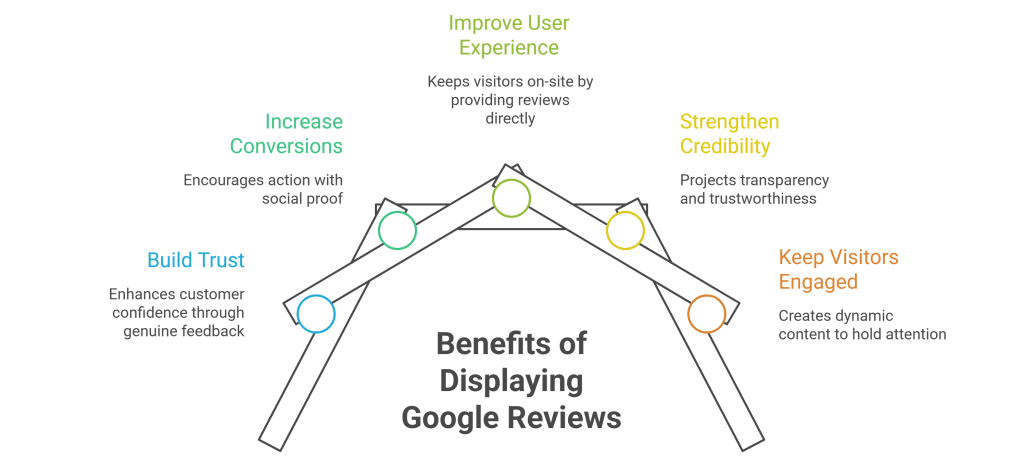
Build Instant Trust
Most customers read reviews before making a purchase or contacting a business. Displaying genuine Google Reviews helps visitors feel more confident about choosing your brand.
Increase Conversions
Reviews act as social proof. When potential customers see positive experiences from real people, they are more likely to take action.
Improve User Experience
Instead of asking visitors to leave your website and search for reviews elsewhere, you can showcase them directly on your pages.
Strengthen Brand Credibility
A website that highlights authentic customer feedback appears more transparent and trustworthy.
Keep Visitors Engaged
Review widgets create dynamic content that encourages users to spend more time on your website.
Methods to Add Google Reviews to Squarespace
There are three common ways to display Google Reviews on a Squarespace website.

Method 1: Use a Google Reviews Widget
The easiest and most professional approach is using a Google Reviews widget.
A review widget automatically collects reviews from your Google Business Profile and displays them on your Squarespace website. Whenever a new review is published on Google, it can automatically appear on your site without manual updates.
Why Use a Review Widget?
- No coding required
- Automatic review updates
- Fully customizable layouts
- Mobile-responsive designs
- Faster implementation
- Better visual presentation
Add Google Reviews to Squarespace Using Taggbox
Taggbox Google Reviews Widget allows businesses to collect, curate, and display Google Reviews through customizable widgets.
Follow these steps:
Step 1: Create a Taggbox Account
Sign up and access the social proof and review widget dashboard.
Step 2: Connect Google Reviews
Choose Google Reviews as your review source and connect your Google Business Profile.
Step 3: Collect and Moderate Reviews
Taggbox lets you manage which reviews appear on your website. This helps maintain a clean and relevant review display.
Step 4: Customize the Widget
Adjust:
- Layout styles
- Colors
- Fonts
- Review cards
- Star ratings
- Display themes
to match your Squarespace website design.
Step 5: Copy the Embed Code
Once the widget is ready, generate the embed code provided by Taggbox.
Step 6: Add the Widget to Squarespace
- Open your Squarespace dashboard.
- Navigate to the page where you want reviews displayed.
- Click Edit.
- Add a Code Block.
- Paste the Taggbox embed code.
- Save and publish the page.
Your Google Reviews will now appear directly on your Squarespace website.
Method 2: Embed Reviews Using Custom Code
Businesses with technical knowledge may choose to manually create a review section using HTML and CSS.
This approach gives complete design control but comes with limitations.
Pros
- Full customization
- No third-party platform required
Cons
- Manual updates
- Time-consuming
- Requires coding knowledge
- Difficult to scale
Whenever you receive new reviews, you’ll need to manually edit and update the content.
For most businesses, this method isn’t practical in the long run.
Method 3: Display Review Screenshots
Some businesses simply take screenshots of their Google Reviews and upload them as images.
Steps
- Capture screenshots of positive reviews.
- Upload the images to Squarespace.
- Add them using Image Blocks.
- Link the image to your Google Business Profile if desired.
Drawbacks
- Reviews become outdated quickly.
- No automatic updates.
- Limited credibility compared to live reviews.
- Poor user experience on mobile devices.
This method works for quick implementation but isn’t ideal for growing businesses.
Where Should You Display Google Reviews on Squarespace?
Many businesses only place reviews on a dedicated testimonial page. However, reviews can be more effective when strategically placed throughout the website.
Homepage
Build trust immediately when visitors arrive.
Service Pages
Support service claims with customer experiences.
Product Pages
Help shoppers make confident buying decisions.
Landing Pages
Increase conversion rates for campaigns and promotions.
Contact Page
Reassure visitors before they submit inquiries.
Best Practices for Displaying Google Reviews
Adding reviews is only part of the process. The way you present them matters too.
Showcase Recent Reviews
Fresh reviews demonstrate that your business is active and consistently delivering positive experiences.
Highlight Detailed Feedback
Longer reviews often provide more value and context than short ratings.
Maintain Authenticity
Avoid editing review content. Authentic customer voices create stronger trust.
Use Responsive Widgets
Ensure reviews display properly across desktops, tablets, and smartphones.
Match Your Website Design
Review sections should blend naturally with your Squarespace branding.
Common Issues When Adding Google Reviews to Squarespace
Reviews Not Showing
Check whether your Google Business Profile connection is active and authorized.
Widget Not Loading
Verify that the embed code has been pasted correctly into the Squarespace Code Block.
Design Doesn’t Match Website
Use customization settings within your review widget platform to align fonts, colors, and layouts.
Reviews Not Updating
Confirm that automatic synchronization is enabled.
Why Businesses Prefer Taggbox for Google Reviews
Businesses often choose Taggbox because it simplifies the entire review display process.
Instead of manually updating testimonials or managing custom code, Taggbox helps:
- Collect reviews from Google
- Moderate review content
- Customize display layouts
- Embed reviews on Squarespace
- Automatically update review feeds
- Create responsive review galleries
This makes it easier to maintain a professional and trustworthy website experience.
Frequently Asked Questions
Can I Add Google Reviews to Squarespace for Free?
Yes. Some review widget platforms offer free plans with limited features. You can also manually add reviews using screenshots or custom code.
Does Squarespace Have a Native Google Reviews Integration?
No. Squarespace currently does not provide a built-in Google Reviews feature, so a third-party solution is typically required.
Can Google Reviews Update Automatically on Squarespace?
Yes. If you’re using a review widget platform such as Taggbox, new reviews can automatically appear on your website after synchronization.
Will Adding Google Reviews Improve SEO?
Google Reviews themselves don’t directly boost website rankings when embedded. However, they can improve trust, engagement, and conversion rates, which contribute to a better overall user experience.
What Is the Easiest Way to Display Google Reviews on Squarespace?
Using a review widget is generally the fastest and most efficient method because it requires minimal technical knowledge and supports automatic updates.
Final Thoughts
Displaying Google Reviews on your Squarespace website is one of the simplest ways to strengthen trust and showcase customer satisfaction.
While manual methods like screenshots and custom coding can work, they require ongoing maintenance. For businesses looking for a scalable solution, using a dedicated review widget provides a more efficient approach.
Platforms like Taggbox make it possible to collect, manage, and display Google Reviews in a visually appealing format while keeping your website updated automatically.
The result is a more credible website, stronger social proof, and a better experience for potential customers.
-
Best Tools to Add a Google Reviews Badge to Your Website

Online reviews have become one of the biggest trust factors for customers in 2026. Before making a purchase, booking a service, or contacting a business, users often check Google reviews to validate credibility and customer satisfaction. That’s why businesses are increasingly adding a Google Reviews Badge to their websites.
A Google Reviews Badge helps businesses showcase ratings, review counts, and customer feedback in a compact and visually engaging format. Whether displayed on the homepage, product pages, landing pages, or checkout pages, a review badge acts as instant social proof that can improve customer trust and conversions.
Modern Google review badge tools now offer:
- Real-time review syncing
- Star rating displays
- Floating badges
- Popup review widgets
- Custom branding
- Mobile responsiveness
- No-code embedding
- Review filtering and moderation
What Is Google Reviews Badge?
A Google Reviews Badge is a small review widget or trust badge that displays ratings and reviews from your Google Business Profile directly on your website.
Unlike full review feeds or testimonial walls, review badges are compact and designed to quickly build trust without taking up too much website space.
Google review badges usually display:
- Average star rating
- Total number of reviews
- Google branding
- Customer testimonials
- Review snippets
- Call-to-action buttons
Businesses commonly place Google review badges on:
- Homepage sections
- Product pages
- Service pages
- Checkout pages
- Footer areas
- Sidebar sections
- Landing pages
A well-designed Google Reviews Badge helps reassure visitors and encourages them to take action confidently.
Why Businesses Need Google Reviews Badges in 2026

Build Instant Customer Trust
Customers trust online reviews almost as much as personal recommendations. Businesses that show Google reviews on website pages can instantly improve credibility, transparency, and customer confidence.
Increase Conversion Rates
Review badges act as social proof during critical decision-making moments. Visitors are more likely to purchase, book, or contact a business when they see positive customer feedback.
Improve Website Engagement
Interactive review badges encourage visitors to explore customer experiences, increasing engagement and time spent on your website.
Showcase Business Reputation
Google review badges help businesses highlight customer satisfaction and reinforce brand reputation in a visible and trustworthy way.
Support Local Business Credibility
For local businesses, Google reviews are especially important because they directly influence customer confidence and local purchasing decisions.
Features to Look for in a Google Reviews Badge Tool
Before choosing a tool, look for features that improve usability, design flexibility, and customer experience.
Real-Time Google Review Sync
Your badge should automatically update whenever new reviews are added to your Google Business Profile.
Responsive Design
The review badge should work smoothly across desktops, tablets, and mobile devices.
Customizable Layouts
Look for tools that offer:
- Floating badges
- Inline badges
- Popup badges
- Sidebar badges
- Carousel badges
- Minimal layouts
Review Moderation
Advanced tools allow businesses to filter reviews, pin featured testimonials, and remove irrelevant content.
Easy Website Integration
The best Google review badge tools provide no-code embedding and easy integration with platforms like:
- WordPress
- Shopify
- Wix
- Squarespace
- Webflow
- HTML websites
Fast Loading Speed
Lightweight review badges improve website performance and user experience.
Best Tools to Add a Google Reviews Badge to Your Website
Taggbox
Taggbox is one of the most advanced platforms for creating and embedding Google Reviews Badges on websites. The platform helps businesses display customer reviews in visually engaging and conversion-focused formats.
Its flexible badge layouts, advanced customization options, and moderation features make it ideal for brands that want premium social proof experiences.
Key Features
- Real-time Google review syncing
- Floating review badges
- Star rating widgets
- Popup review displays
- AI-powered moderation
- Mobile-responsive badges
- No-code embedding
- Advanced customization
Best For
- Ecommerce stores
- Agencies
- SaaS businesses
- Enterprise websites
- Local businesses
Why Choose Taggbox?
Taggbox is ideal for businesses looking for highly customizable Google review badges with strong branding and engagement features.
Trustindex
Trustindex is a popular review plugin that allows businesses to add Google review badges and widgets easily, especially on WordPress websites.
The platform focuses on simplicity, flexible layouts, and beginner-friendly setup.
Key Features
- Google review badges
- Star rating widgets
- Multiple display layouts
- Responsive design
- Review filters
Best For
- Bloggers
- Agencies
Jotform
Jotform offers a lightweight Google Reviews Badge solution for businesses that want quick setup without advanced technical configurations.
It is especially useful for smaller websites and beginners.
Key Features
- Quick badge generator
- Simple integration
- Responsive widgets
- Beginner-friendly dashboard
- Basic customization
Best For
- Small businesses
- Beginners
Smash Balloon
Smash Balloon helps businesses display Google reviews through responsive review feeds and badge-style layouts.
It is especially popular among WordPress users who want dynamic review content integrated with their website design.
Key Features
- Google and Facebook reviews
- Responsive layouts
- Dynamic review feeds
- Customizable widgets
- WordPress compatibility
- Lightweight performance
Best For
- Bloggers
- Content-driven websites
Common Ninja
Common Ninja offers modern and visually attractive Google review badges with strong customization capabilities.
Its design-focused approach makes it suitable for creative brands and modern websites.
Key Features
- Floating review badges
- Interactive layouts
- Grid and card styles
- Responsive design
- Advanced customization
- Stylish templates
Best For
- Agencies
- Portfolio websites
Best Google Reviews Badge Tools for WordPress
WordPress users often prefer plugins that provide direct integration and flexible customization.
Top Recommendations
- Taggbox
- WP Business Reviews
These tools are beginner-friendly and work well with most WordPress themes.
Best Google Reviews Badge Tools for Shopify
Shopify stores need review badges that improve trust and support conversions.
Recommended Tools
- Taggbox
- Common Ninja
These tools help merchants display review badges on:
- Product pages
- Collection pages
- Homepage sections
- Checkout pages
Best Google Reviews Badge Tools for Wix & Webflow
No-code website builders require lightweight and easy-to-embed review badges.
Recommended Tools
- Taggbox
- Jotform
These tools provide simple copy-paste embedding and responsive badge layouts.
Benefits of Adding a Google Reviews Badge to Your Website
Builds Strong Social Proof
Review badges help visitors instantly validate your business reputation.
Improves Customer Confidence
Positive ratings encourage visitors to trust your products or services.
Enhances Website Design
Modern review badges add visual credibility without cluttering the page.
Encourages More Conversions
Displaying customer satisfaction near CTAs can improve conversion rates significantly.
Increases User Engagement
Interactive review badges encourage users to explore reviews and spend more time on your website.
Best Places to Add a Google Reviews Badge
Strategic placement can maximize the effectiveness of your review badge.
Recommended Placement Areas
- Homepage hero section
- Product pages
- Service pages
- Checkout pages
- Landing pages
- Sidebar widgets
- Sticky floating corners
- Footer sections
Placing review badges near CTAs and pricing sections often delivers the best results.
Google Reviews Badge vs Full Review Widget
Google Reviews Badge
Best for:
- Compact social proof
- Minimal design impact
- Quick trust-building
- Small website sections
Full Review Widget
Best for:
- Detailed testimonials
- Customer stories
- Review-heavy websites
- Engagement-focused layouts
Many businesses combine both badges and full review widgets for maximum impact.
Final Thoughts
Adding a Google Reviews Badge to your website is one of the simplest ways to improve trust, strengthen social proof, and increase customer confidence.
If you want advanced customization and conversion-focused review displays, Taggbox is one of the best Google Reviews Badge tools available in 2026. For WordPress users. The best Google Reviews Badge tool ultimately depends on your website platform, design preferences, business goals, and customization needs.
FAQs
What is a Google Reviews Badge?
A Google Reviews Badge is a small widget that displays your Google ratings and customer reviews on your website.
Why should I add a Google Reviews Badge to my website?
Google review badges help build customer trust, improve social proof, and increase conversions by showcasing authentic customer feedback.
Can I add a Google Reviews Badge to WordPress?
Yes. Tools like Taggbox offer easy WordPress integration.
Are Google Reviews Badges mobile responsive?
Most modern Google Reviews Badge tools are fully responsive and optimized for mobile devices.
Which Google Reviews Badge tool is best for ecommerce websites?
Taggbox is one of the best options for ecommerce websites because of its advanced customization, moderation, and conversion-focused layouts.
-
Top Elfsight Google Reviews Widget Alternatives in 2026

Customer reviews are no longer optional—they’re a core conversion driver.
If you’re using the Elfsight Google Reviews Widget, you’re already on the right track by showcasing social proof. But as your business grows, you may start noticing limitations in flexibility, performance, and scalability.
That’s exactly why businesses, marketers, and agencies are actively searching for Elfsight Google Reviews Widget alternatives that offer more control, better performance, and higher ROI.
In this guide, we’ll cover:
- What Elfsight offers (and where it falls short)
- Detailed breakdown of the best alternatives in 2026
- How to choose the right tool based on your needs
What is Elfsight Google Reviews Widget?
The Elfsight Google Reviews Widget is a no-code tool that allows businesses to embed Google reviews on a website to build trust and improve conversions.
Core Capabilities:
- Embed Google reviews easily
- Pre-built layouts and themes
- Basic filtering options
- Cross-platform compatibility (WordPress, Shopify, HTML, etc.)
Where It Works Well:
- Small businesses
- Basic use cases
- Quick implementation without technical effort
However, for performance marketers, agencies, and scaling brands, the limitations become more visible.
Why Look for Elfsight Alternatives?
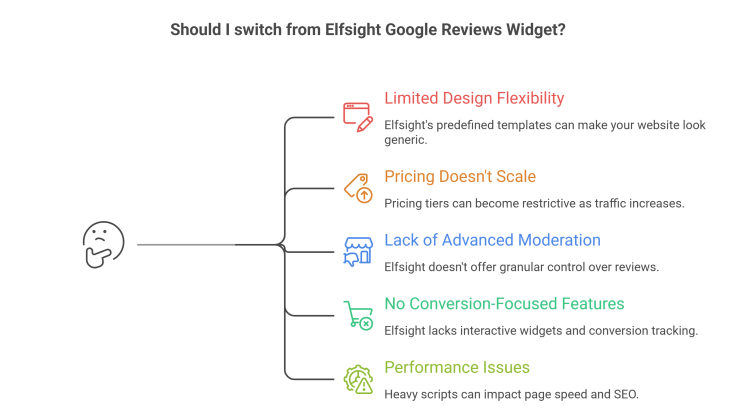
1. Limited Design Flexibility
You’re restricted to predefined templates, which can make your website look generic.
2. Pricing Doesn’t Scale Well
As your traffic or widget views increase, pricing tiers can become restrictive.
3. Lack of Advanced Moderation
You don’t get granular control over:
- Which reviews to display
- Keyword-based filtering
- Highlighting high-converting reviews
4. No Conversion-Focused Features
Most businesses today want:
- Clickable CTAs
- Interactive widgets
- Conversion tracking
Elfsight doesn’t fully support this.
5. Performance & Load Speed
Heavy scripts can impact page speed, which affects:
- SEO rankings
- Bounce rate
- User experience
Top Elfsight Google Reviews Widget Alternatives in 2026:
1. Tagembed – Social Media Aggregator

Tagembed is the most popular social media feed aggregator tool. It is a user-friendly review aggregation platform that helps businesses collect, customize, and display Google profile reviews on websites without requiring technical expertise.
Key Features:
✅ Google Review Aggregation
- Collect and display Google reviews in real time
- Maintain fresh and authentic social proof on your website
✅ Multiple Widget Layouts
- Grid, carousel, slider, and badge formats
- Easily match widgets with your website design
✅ Advanced Customization & Moderation
- Customize colors, themes, fonts, and layouts
- Filter and moderate reviews before publishing
✅ No-Code Website Integration
- Simple embed code for quick installation
- Compatible with popular website builders and CMS platforms
Best Use Cases:
- Businesses showcasing customer trust
- E-commerce stores looking to improve conversion rates
- Agencies managing review displays for multiple clients
🚫 Limitations:
- Some advanced customization and premium features are available only in higher-tier plans
- Feature availability varies across pricing plans
2. Taggbox — Best Overall Elfsight Alternative
Taggbox is not just a Google review widget tool—it’s a conversion-focused social proof platform built for modern marketers. Taggbox helps you easily show Google reviews on your website in a clean and customizable way. It gives you more control over which reviews to display and helps you turn reviews into trust and conversions. It’s a great option for businesses that want better design and performance.
Why Taggbox is a Strong Alternative
Unlike Elfsight, Taggbox focuses on turning reviews into revenue, not just displaying them.
Key Features:
✅ Advanced Moderation & Filtering
- Filter reviews by keywords, ratings, or sentiment
- Hide irrelevant or low-quality reviews
- Highlight top-performing testimonials
✅ AI-Powered Content Curation
- Automatically selects high-quality reviews
- Reduces manual effort
- Keeps content fresh and relevant
✅ High-Level Customization
- Fully customizable layouts
- Brand-aligned design options
- Control over fonts, colors, and spacing
✅ Real-Time Syncing
- Automatically pulls new Google reviews
- Keeps your website updated without manual work
✅ Performance Optimized
- Lightweight widgets
- Faster load time vs traditional tools
- Helps improve SEO and Core Web Vitals
✅ Conversion-Focused Features
- Add CTA buttons inside widgets
- Use reviews in landing pages
- Boost trust at key conversion points
Best Use Cases
- eCommerce websites
- DTC brands
- SaaS landing pages
- Agencies managing multiple clients
🚫 Where It Might Not Fit:
- If you only need a very basic free widget with no scaling plans
3. Trustindex
Trustindex is a simple and affordable tool designed specifically for review aggregation.
Key Features:
✅ Multiple Platform Integration
- Supports 100+ platforms
- Good for diverse review sources
✅ Pre-Built Templates
- Quick setup
- No design effort required
✅ Lightweight Plugin
- Works well on WordPress
- Minimal performance impact
Best Use Cases:
- Small businesses
- Budget-conscious users
🚫 Limitations:
- Limited design flexibility
- Basic analytics and reporting
- Not ideal for conversion optimization
4. SociableKIT
SociableKIT is a beginner-friendly tool for embedding social feeds and reviews.
Key Features:
✅ Easy Setup
- No coding required
- Fast implementation
✅ Clean Interface
- Simple dashboard
- Easy to manage
✅ Affordable Pricing
- Good entry-level option
Best Use Cases:
- Beginners
- Personal websites
- Small projects
🚫 Limitations:
- Lacks advanced features
- Limited scalability
- Not built for high-growth businesses
5. Juicer

Juicer is primarily a social media aggregator but can be used for a review aggregator display as well.
Key Features:
✅ Multi-Platform Feeds
- Instagram, Twitter, Facebook, etc.
✅ Clean Visual Display
- Modern layouts
✅ Easy Embedding
Best Use Cases:
- Brands focusing on social proof beyond reviews
🚫 Limitations:
- Not optimized specifically for Google reviews
- Limited review-focused features
Detailed Comparison Table
Feature Elfsight Taggbox Tagembed Trustindex SociableKIT Customization Limited Advanced Advanced Basic Basic Moderation Basic Advanced Advabced Basic Basic AI Features No Yes Yes No No Performance Medium High High Medium Medium Scalability Limited High High Medium Low Conversion Focus Low Medium High Low Low How to Choose the Best Elfsight Alternative?
To rank better and convert more, your tool should support:
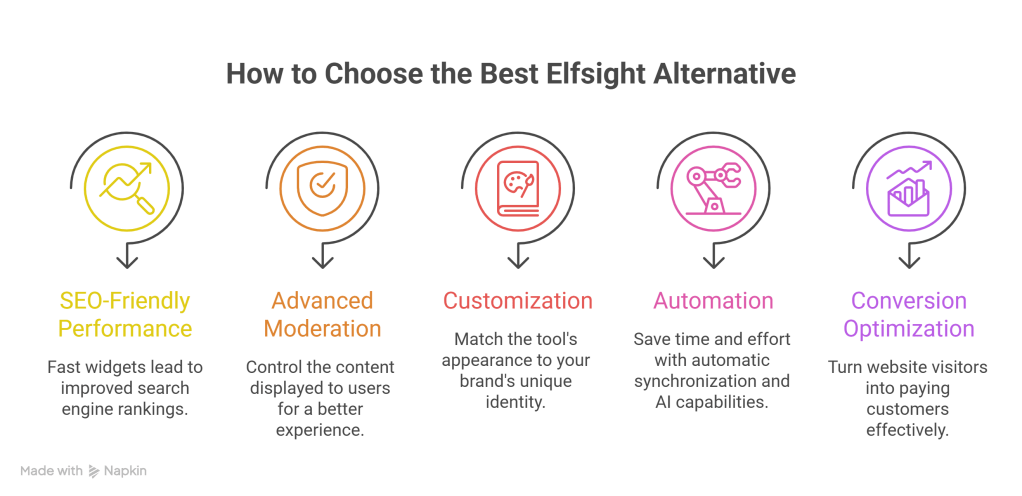
✅ SEO-Friendly Performance
Fast widgets = better rankings
✅ Advanced Moderation
Control what users see
✅ Customization
Match your brand identity
✅ Automation
Save time with auto-sync and AI
✅ Conversion Optimization
Turn visitors into customers
Why Tagembed is the Best Elfsight Alternative
Tagembed stands out because it aligns with modern marketing needs:
- Not just a widget → a conversion engine
- Not just display → engagement + trust + sales
If your goal is to:
- Increase trust
- Improve conversions
- Scale your website
👉 Tagembed clearly outperforms Elfsight. And this is the best Elfsight alternative.
Conclusion
Elfsight is a good starting point—but not the best long-term solution.
As your business grows, you need:
- Better customization
- Stronger performance
- Conversion-focused features
👉 That’s where tools like Tagembed & Taggbox take the lead.
FAQs
What is the best alternative to Elfsight Google Reviews Widget?
Tagembed is one of the best alternatives due to its advanced customization, AI moderation, and conversion-focused features.
Can I embed Google reviews on my website without Elfsight?
Yes, tools like Taggbox, Tagembed, and Trustindex allow easy embedding without coding.
Which Google Reviews widget is best for SEO?
A fast-loading and customizable widget like Tagembed is ideal for SEO.
Are there free alternatives to Elfsight?
Yes, but most free tools come with limitations like branding and restricted features.
-
Add Live Google Reviews to Your Google Sites Website

Your website is often the first place people interact with your brand. Before they fill out a form, make a call, or place an order, they’re silently asking one question: Can I trust this business?
Live Google reviews answer that question instantly.
Instead of asking visitors to leave your site and search for your business on Google, you can bring those reviews directly onto your Google Sites website — updated in real time, visible to everyone, and working as social proof around the clock.
Why Businesses Choose to Embed Google Reviews on Website Pages
When people visit a website, they don’t want marketing claims — they want reassurance from real customers. That’s exactly what live Google reviews provide.
When you embed Google reviews on website pages, you’re showing feedback that feels authentic because it is authentic. Reviews come straight from your Google Business Profile and update automatically whenever a new customer leaves one.
Here’s why this matters so much:
1. Reviews Reduce Trust Friction
A well-designed website can still feel risky to a first-time visitor. Reviews reduce hesitation. Seeing genuine customer experiences helps users feel confident about taking the next step.
2. Visitors Stay Longer on Your Website
People read reviews carefully. They scan ratings, read comments, and compare experiences. This extra engagement increases time spent on your site — a positive signal for both conversions and search engines.
3. You Control Where Reviews Appear
Instead of hoping users find your Google listing, you decide where reviews show up — homepage, services page, testimonials section, or even a pricing page.
4. Live Reviews Always Stay Fresh
Static testimonials can feel outdated. Live Google reviews update automatically, so your site always reflects your most recent customer feedback without any manual work.
What You Need Before Adding Live Google Reviews
Before jumping into the setup, make sure you have the basics ready:
- An active Google Business Profile with published reviews
- Access to Google Sites editor
- A third-party review widget tool that supports Google Sites embedding
- Permission to embed custom HTML content
Once these are in place, the setup is straightforward — even if you’ve never touched code before.
Step-by-Step: How to Add Live Google Reviews to Google Sites
Step 1: Generate Your Google Reviews Widget
Google Sites doesn’t natively support a live Google reviews widget, so you’ll need a widget tool like Tagembed & Taggbox that pulls reviews from your Google Business Profile.
Most tools work the same way:
- Connect your Google Business listing
- Choose how many reviews to display
- Select a layout (slider, grid, or list)
- Customize fonts, colors, and star styles
- Generate an embed code
This embed code is what connects your Google reviews to your website.
Step 2: Open Your Google Sites Editor
Log in to Google Sites and open the website where you want to display reviews.
Navigate to the page where reviews make the most sense:
- Homepage (for instant trust)
- Testimonials page
- Service or product page
- Contact or booking page
Step 3: Insert an Embed Block
In the Google Sites editor:
- Click Insert from the right sidebar
- Select Embed
- Choose Embed code
- Paste the widget HTML code into the box
Google Sites will show a live preview so you can confirm everything looks right.
Step 4: Adjust Size, Position, and Layout
Once embedded, you can:
- Resize the widget block
- Move it up or down the page
- Align it with text or images
- Place it inside a dedicated reviews section
Take a moment to check spacing and alignment — reviews should be easy to read without overwhelming the page.
Step 5: Publish and Test
Click Publish and open your site in a new tab.
Make sure to test:
- Desktop view
- Mobile view
- Loading speed
- Review updates
If everything looks good, your live Google reviews are now fully active.
Best Practices for Displaying Google Reviews Effectively
Simply adding reviews isn’t enough — placement and presentation matter.
Highlight Quality Over Quantity
Showing 5–10 strong reviews often works better than displaying dozens at once. It keeps the section readable and focused.
Place Reviews Near Conversion Points
Reviews are most effective near:
- Call-to-action buttons
- Contact forms
- Pricing sections
- Booking or inquiry areas
Keep the Design Consistent
Match review fonts and colors with your site’s design. Reviews should feel like part of your website, not a disconnected widget.
Avoid Over-Filtering
Authenticity matters. Showing only perfect reviews can feel suspicious. A mix of honest feedback builds more trust.
Common Mistakes to Avoid
- Using screenshots instead of live reviews
Screenshots don’t update and feel outdated quickly. - Hiding reviews too far down the page
If users can’t easily find them, their impact is lost. - Ignoring mobile layout
Most visitors browse on mobile — always check responsiveness.
Final Thoughts
Adding live Google reviews to your Google Sites website is one of the simplest ways to build trust, increase engagement, and influence decisions — without redesigning your site or writing extra content.
With the right widget and thoughtful placement, your reviews become a powerful credibility tool that works continuously for your business.
-
Subscribe
Subscribed
Have a WordPress.com account? Log in now.

