-
Taggbox vs Common Ninja: Which Review Widget Is Better for Your Website?

Taggbox and Common Ninja are two popular tools that help you display Google reviews and other social proof on your website. Both are useful, but they address slightly different needs, so choosing the right one depends on your goals, budget, and the level of design control you want.
What Is Taggbox?
Taggbox is a social proof and UGC platform that lets you collect, curate, and embed social media feeds and customer reviews from multiple channels. It is built for brands that want visually rich, on‑brand widgets and deeper control over how content appears.
Key highlights:
- Aggregates content from 20+ social platforms, including Google, Facebook, Instagram, and more.
- Strong focus on visual layouts, social walls, and mixed UGC (posts, images, videos, and reviews).
- A good choice if you want more than a basic reviews block and plan to build a full social proof section.
What Is Common Ninja?
Common Ninja is a widget library with many ready‑made widgets, such as Google Reviews, all‑in‑one review widgets, tabs, sliders, and social media tools. It focuses on making it easy to add functional, responsive widgets with minimal setup.
Key highlights:
- Offers a dedicated Google Reviews widget to pull and display Google reviews from your Google Business Profile.
- Includes extra widgets like FAQs, sliders, pricing tables, and social tools, so you can cover more website needs from one dashboard.
- A good pick if you want simple, quick widgets that just work without complex configuration.
Taggbox: Best Features for Reviews and Social Proof
Taggbox offers a powerful Google Reviews widget as part of its broader social proof suite. If your main goal is to build trust with rich content, this makes a big difference.
Notable features:
- Pulls in reviews directly from Google via a secure API connection, so you can display Google reviews authentically and stay policy‑compliant.
- Let’s you customize layouts, fonts, colors, and CTAs to match your brand, and even add banners or pop‑ups to highlight key testimonials.
- Includes moderation tools that let you hide certain reviews, pin the best ones, and control what appears publicly.
- Provides analytics and AI‑powered insights to understand sentiment, top themes, and widget performance.
Because Taggbox also supports social feeds, you can mix reviews with a Facebook widget, Instagram feed, or other UGC to create a highly engaging social wall on your homepage or landing pages.
Common Ninja: Best Features for Simplicity and Speed
Common Ninja shines when you want quick, easy widgets that are still flexible and good‑looking. Its Google Reviews widget is built to be simple enough for non‑technical users.
Notable features:
- Google Reviews widget pulls reviews and shows them in a clean, responsive design that works on desktop and mobile.
- Offers options for sorting, filtering, and styling so you can highlight specific reviews or keep a consistent layout.
- Many widgets (including reviews and social tools) can be embedded with a short snippet of code, making setup very fast.
- Freemium model: you can often start free and upgrade only when you need more views or advanced options.
For basic social presence, you can pair the reviews widget with a Facebook widget or social links widget to show your profiles and make it easy for visitors to connect.
How Each Helps You Display Google Reviews
Showing real customer feedback is one of the most effective ways to build trust and improve conversions, so the ability to display Google reviews properly is critical.
- With Taggbox, you can:
- With Common Ninja, you can:
Where a Google Review Link Generator Fits In
Neither Taggbox nor Common Ninja is primarily a Google review link generator, but both work very well with one.
A Google review link generator creates a direct link that takes customers straight to your Google review form, making it easier to collect new feedback from email, WhatsApp, SMS, or your site. Once you get more reviews through that link, you can:
- Use Taggbox to display Google reviews in a highly customized widget with analytics and moderation.
- Use Common Ninja to drop a simple, responsive reviews widget anywhere on your site with a few clicks.
Together, this creates a complete loop: generate reviews with a Google review link generator, then display them with Taggbox or Common Ninja to turn them into visible social proof.
Which One Should You Choose?
Both tools are strong, but they fit slightly different use cases, so the best choice depends on your priorities.
Choose Taggbox if:
- You want advanced control over design, moderation, and analytics for your review widgets.
- You plan to build rich social walls that combine reviews, Instagram, and a Facebook widget or other social content.
- You care about deep branding and are willing to invest a bit more time in setup.
Choose Common Ninja if:
- You want a fast, straightforward way to display Google reviews without complex configuration.
- You like the idea of having many different widgets (reviews, tabs, sliders, social tools) in a single platform.
- You prefer a freemium model and lightweight widgets that you can add in minutes.
In simple terms, Taggbox is ideal when you want powerful, highly customizable social proof experiences, while Common Ninja is better when you want quick, flexible widgets to show reviews and social signals with minimal effort. Both become even more effective when combined with a good Google review link generator so you can collect and showcase customer feedback in a complete, SEO‑friendly way.
-
Why Social Proof is the Missing Piece in High-Converting Websites

In today’s digital-first world, your website is often the very first interaction a potential customer has with your brand. You might have invested in clean design, fast loading speed, compelling copy, and even paid traffic—but if conversions still feel underwhelming, the problem may not be your product or pricing.
The real gap is trust. And that’s exactly where social proof comes in.
Social proof is no longer a “nice-to-have” element. It’s the deciding factor between a visitor who scrolls and leaves, and one who takes action.
What Is Social Proof—and Why Does It Matter So Much?
Social proof is the psychological principle where people rely on the actions and opinions of others to decide what to do. In simple terms, visitors ask themselves:
“If others trust this brand, can I trust it too?”
Online, social proof shows up as:
- Customer reviews and ratings
- Testimonials and case studies
- User-generated content (UGC)
- Brand mentions and recognitions
When done right, social proof reduces uncertainty, validates decisions, and shortens the buyer’s journey.
The Conversion Problem Most Websites Don’t See
Many websites fail to convert not because they lack information—but because they lack validation.
A visitor may like your product. They may understand your pricing. But one silent question still remains:
“Has this worked for someone like me?”
Without visible proof, visitors hesitate. They leave. And that hesitation compounds across every landing page, product page, and checkout step.
High-converting websites don’t just tell visitors they’re trustworthy. They show it.
Why Reviews Are the Strongest Form of Social Proof
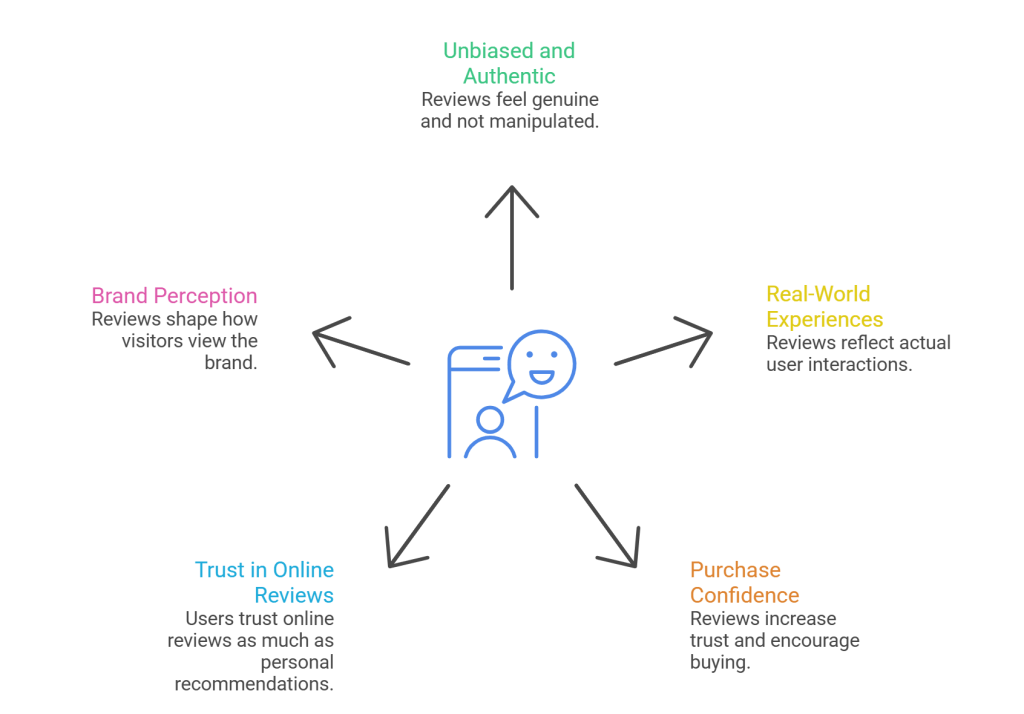
Among all forms of social proof, customer reviews hold unmatched influence.
Real reviews:
- Feel unbiased and authentic
- Reflect real-world experiences
- Directly impact purchase confidence
In fact, users trust online reviews almost as much as personal recommendations. A single well-placed review section can dramatically change how a visitor perceives your brand.
That’s why leading businesses actively display their reviews on high-visibility pages instead of hiding them on third-party platforms.
The Shift: From External Reviews to On-Site Trust Signals
Earlier, businesses relied on platforms like Google, Yelp, or Facebook to host their reviews. While those platforms still matter, modern conversion-focused brands take it one step further.
They bring reviews onto their own website.
When reviews live on your site:
- Visitors don’t need to leave to verify credibility
- Trust is built at the exact moment of decision-making
- Conversions happen faster
This is where tools designed specifically for review display become essential.
How a Google Review Widget Changes Website Behavior
A google review widget allows businesses to display real, verified Google reviews directly on their website in a clean, visually appealing format.
Instead of asking users to “check our reviews,” you put proof right in front of them.
When visitors see:
- Real customer names
- Star ratings
- Honest feedback
They stop questioning your credibility and start focusing on whether your product fits their needs.
That shift alone can significantly increase:
- Lead form submissions
- Checkout completions
- Demo bookings
Where Social Proof Works Best on a Website
To maximize impact, social proof shouldn’t be randomly placed. High-performing websites strategically display reviews at key touchpoints:
- Homepage: Establish trust immediately
- Product or service pages: Reduce purchase anxiety
- Landing pages: Reinforce ad claims
- Checkout pages: Prevent last-minute drop-offs
The goal is simple: show reassurance exactly when doubt appears.
Why Visual Presentation of Reviews Matters
Not all review displays are equal. A poorly formatted block of text won’t inspire trust.
High-converting websites use review widgets that:
- Match the website’s design
- Load quickly
- Are mobile-friendly
- Update automatically with new reviews
This is where platforms like Taggbox stand out.
Taggbox enables brands to collect, moderate, and display Google reviews seamlessly—turning raw feedback into polished social proof that blends naturally into any website layout.
Turning Reviews Into Conversion Assets
When reviews are presented correctly, they do more than build trust—they actively sell for you.
A well-placed review can:
- Answer objections without sales copy
- Highlight benefits through real experiences
- Validate pricing and quality
Instead of saying “We’re the best,” you let customers say it for you.
This approach feels authentic, human, and far more persuasive than traditional marketing claims.
How Businesses Embed Reviews Without Technical Hassle
Modern tools make it easy to embed google reviews on website pages without complex development work.
With the right widget solution:
- No coding expertise is required
- Updates happen automatically
- Design remains fully customizable
This allows marketing teams to focus on messaging and optimization rather than technical setup.
Social Proof as a Long-Term Conversion Strategy
Social proof isn’t a one-time tactic—it compounds over time.
As more customers leave reviews:
- Your website grows more credible
- New visitors convert faster
- Paid traffic performs better
Over months, this creates a trust-driven growth loop where every new customer helps bring the next one.
Final Thoughts
If your website isn’t converting as expected, the problem may not be traffic, design, or pricing. More often than not, it’s the absence of visible trust.
Social proof—especially customer reviews—is the missing piece that transforms hesitation into action.
By showcasing real experiences through a well-designed google review widget and leveraging platforms like Taggbox, businesses can turn their websites into confidence-building machines that don’t just attract visitors—but convert them.
In a world where trust decides everything, social proof isn’t optional anymore. It’s the foundation of high-converting websites.
-
Why Google Reviews Are Not Showing (And How to Fix It)

Google reviews play a crucial role in building trust, improving your local search visibility, and helping potential customers decide whether to choose your business. However, many business owners encounter a frustrating issue: Google reviews not appearing on their business profiles or websites.
In this guide, we explain the common causes of this issue and provide practical solutions to ensure your reviews appear correctly. We will also cover how to add Google reviews to your site using tools such as a Google Reviews widget, and why it’s important to verify your business on Google.
1. Your Business Profile Is Not Verified
One of the most common reasons Google reviews do not appear is that the business listing has not been fully verified. When you set up a Google Business Profile (GBP), Google requires verification before reviews are displayed publicly. This process confirms that you are the legitimate owner of the business.
Google can verify your business on Google in several ways, most commonly through:
- A postcard sent to your physical business address
- A phone call or SMS code
- Email verification (in some cases)
If your business is not verified, reviews may not appear. This is a key reason Google hides reviews to prevent fake or spam listings on its platform.
👉 What to do: Go to your Google Business Profile dashboard and complete the verification. This step is essential if you want customers to leave and see their Google reviews. Remember, you must verify your business on Google before reviews will consistently appear.
2. Your Listing Information Is Incorrect or Incomplete
Incorrect or outdated business information can prevent your reviews from displaying. Google uses your business details (like name, address, and phone number) to identify your listing. If this information is inconsistent or incomplete, Google may not show reviews properly.
Examples of listing issues include:
- Wrong business name
- Invalid phone number
- Incorrect address or zip code
- Inconsistent NAP (Name, Address, Phone) data across web listings
👉 How to fix it:
Update all your business information in your Google Business Profile to match exactly how it appears on other directories and your website. Even small inconsistencies can confuse Google’s system and affect review visibility.
3. Duplicate or Merged Business Listings
Sometimes businesses accidentally create multiple listings on Google. This can result in reviews showing on one profile but not on the one you are actively managing. Google may also merge duplicate listings, which can temporarily hide reviews during the verification process.
👉 Solution:
Check Google Maps and Google Search for duplicates of your business. If you find multiple listings, merge them into one verified profile. This helps centralize reviews and improve visibility.
4. New Reviews Are Under Google’s Review Queue
Google sometimes holds new reviews for quality checks before publishing them. This can cause a delay between when customers submit Google reviews and when they appear publicly. Google’s internal filtering system evaluates authenticity and relevance before displaying feedback.
In some cases, reviews can take a few days to appear, especially if they are posted very quickly or flagged for review by Google’s AI and quality checks.
👉 Tip: Ask customers to be patient, and encourage them to write detailed, genuine reviews rather than short, vague comments.
5. Reviews Violate Google’s Content Policy
Google has strict rules about what kind of content is allowed in reviews. If a review contains prohibited content, it may be automatically filtered out and removed. Common reasons for removal include:
- Reviews containing links or URLs
- Profanity or offensive language
- Personal attacks or inappropriate statements
- Promotional content
- Fake or paid reviews
Google wants to ensure that reviews reflect authentic experiences. Any violation of their guidelines may prevent the review from appearing.
👉 Guidance for customers:
Encourage reviewers to focus on factual, respectful feedback that relates directly to their experience with your business.
6. Reviewer Account Issues
Sometimes the problem isn’t your business listing, it’s the account of the person who left the review. Google may hide reviews from accounts that appear inactive, newly created, or flagged for spam. If the reviewer’s Google account is suspended or deleted, the review will disappear from your profile.
This is often out of your control, but it’s something to keep in mind when troubleshooting missing reviews.
7. Temporary Technical Glitches or Delays
Even Google isn’t immune to occasional bugs and system delays. Reviews may temporarily be unavailable due to backend updates, algorithm changes, or caching issues. In these situations, the review might reappear after a few days, once the system has finished syncing.
If you suspect a technical glitch:
- Try viewing the profile in incognito mode
- Check from different devices
- Wait 48–72 hours to see if the issue resolves itself
Many temporary issues don’t require action other than patience.
8. Reviews Are Marked as Spam or Suspicious
Google’s automatic spam detection can hide reviews it considers untrustworthy. If a reviewer posts multiple reviews in a short time, uses very generic text, or exhibits a pattern that matches known spam indicators, Google may conceal those reviews. This filtering is intended to protect users from fake or misleading feedback.
👉 Encourage organic reviews:
Ask customers to leave thoughtful, specific reviews spread out over time rather than all at once.
9. The Review Was Removed by the Reviewer
Sometimes, missing reviews aren’t a Google issue at all; the user simply deleted their review. Customers can remove their own reviews at any time; once removed, they will no longer appear on your profile.
There’s no way for a business to restore a review that the customer deleted, so focus on earning new reviews instead.
How to Display Google Reviews on Your Website
Once your Google reviews are showing on your profile, you can further amplify their impact by embedding them on your website using a Google reviews widget. These widgets pull your latest reviews in real time and display them elegantly on your pages, boosting trust and credibility with visitors.
Widgets can be customized in layout and design to match your website’s theme, and most modern solutions update automatically when new reviews are posted, giving you fresh social proof without manual updates.
👉 This method is especially helpful if your customers can’t always find your Google Business listing, but will see positive feedback when browsing your site.
Best Practices for Getting More Visible Google Reviews
Here are actionable tips to ensure your reviews show up and stay visible:
✔ Ask customers to leave reviews
Send direct links to your Google Business Profile so they can review you.
✔ Encourage detailed reviews
Longer, genuine feedback is less likely to be filtered as spam.
✔ Avoid incentivizing reviews
Offering rewards for reviews can violate Google’s policies and result in review hiding or removal.
✔ Keep your business information updated
Accurate details help Google recognize your listing and show reviews properly.
✔ Respond to reviews promptly
Active engagement signals to Google that your listing is maintained and trustworthy.
Conclusion
Missing Google reviews can be frustrating, but in most cases, they are not gone forever; they’re hidden due to verification issues, policy filters, or profile discrepancies. By ensuring you verify your business on Google, keeping your information accurate, and encourage genuine customer feedback, you will improve review visibility over time.
Once your reviews are live, you can add Google Reviews to your website using a Google Reviews widget to increase engagement and social proof, making your business appear more credible and trustworthy to potential customers.
Understanding why Google reviews aren’t showing up is the first step toward maximizing their visibility and positive impact on your brand.
-
Google Reviews vs Facebook Reviews: Which Is Better for Your Business?

Online reviews play an essential role in how customers choose a business. Before buying a product or contacting a service, people often check what others are saying online. Two of the most popular review platforms today are Google Reviews and Facebook Reviews. Both offer value, but they work in different ways.
In this blog, we’ll compare Google Reviews vs Facebook Reviews in an easy-to-understand and straightforward way to help you decide which one is better for your business.
What Are Google Reviews?
Google Reviews are customer reviews that appear on Google Search and Google Maps. When someone searches for a business name or a service nearby, Google often displays ratings and reviews directly in the search results.
Google Reviews are widely trusted because they are closely connected to search behavior. Customers can easily leave reviews, and businesses can respond to them through their Google Business Profile.
Many businesses also choose to add Google reviews to their websites using a Google review widget. This helps show real customer feedback and builds trust with website visitors.
What Are Facebook Reviews?
Facebook Reviews appear on a business’s Facebook Page. Customers can leave ratings, write recommendations, and share their experiences with friends and followers.
Facebook Reviews are more social in nature. They are often influenced by personal connections and interactions. Since Facebook is a social media platform, reviews can spark conversations, comments, and shares.
Facebook reviews work well for businesses that rely on community engagement, social presence, and brand interaction.
Visibility and Reach
One major difference between Google Reviews and Facebook Reviews is visibility.
Google Reviews on webiste appear when users are actively searching for a business or service. This makes them highly visible to people who already have buying intent. Google reviews in SEO play a key role in helping businesses appear in local search results.
Facebook Reviews are mostly seen by people who follow your page or are connected to your audience. While they are useful for engagement, they may not always reach new customers who are searching for services.
Impact on SEO
When it comes to search engine optimization, Google Reviews have a clear advantage.
Google reviews in SEO help improve:
- Local search rankings
- Click-through rates
- Trust signals for search engines
- Visibility on Google Maps
Businesses with more positive Google Reviews often rank higher in local search results. This makes Google Reviews a powerful tool for organic traffic.
Facebook Reviews do not directly impact Google rankings. However, they can support brand awareness and drive traffic through social sharing.
Trust and Credibility
Both platforms help build trust, but in different ways.
Google Reviews are often seen as more neutral and reliable because they are linked to real searches and locations. Customers trust Google Reviews when comparing businesses.
Facebook Reviews benefit from social proof. When people see friends or family members recommending a business, it can strongly influence their decisions.
For maximum credibility, many businesses choose to use both platforms together.
Adding Reviews to Your Website
Displaying reviews on your website is a smart way to build trust and improve conversions.
With a google review widget, businesses can easily show Google Reviews on their website. This allows visitors to see real customer experiences without leaving the site.
When you add Google reviews to landing pages or product pages, it can:
- Reduce customer hesitation
- Increase engagement
- Improve conversion rates
- Strengthen brand trust
Facebook Reviews can also be displayed on websites, but Google Reviews are often more effective for SEO and credibility.
Customization Options
One important factor for businesses is the ability to customize how reviews are displayed.
Many tools allow you to customize Google reviews by choosing layouts, colors, filters, and review types. This helps match reviews with your website design and branding.
You can highlight:
- Top-rated reviews
- Recent reviews
- Keyword-specific reviews
- Star ratings only
Facebook Reviews offer fewer customization options and often depend on Facebook’s layout and design.
User Engagement and Interaction
Facebook Reviews encourage interaction. Users can comment, react, and share reviews easily. This makes Facebook a good platform for engagement and discussions.
Google Reviews are more focused on search and decision-making. While users can like reviews and see responses, the interaction level is lower compared to Facebook.
If your goal is conversation and community building, Facebook Reviews are useful. If your goal is conversions and visibility, Google Reviews perform better.
Ease of Review Collection
Both platforms make it easy for customers to leave reviews.
Google Reviews can be collected by sharing a direct review link or asking customers after a service or purchase. Many businesses include review requests in emails or messages.
Facebook Reviews are often collected through page prompts or social posts. Customers who already follow your page are more likely to leave feedback.
Consistency is key on both platforms. Regular reviews help maintain trust and relevance.
Which Platform Should You Choose?
The choice between Google Reviews and Facebook Reviews depends on your business goals.
Choose Google Reviews if:
- You want better local SEO
- You want more search visibility
- You want to attract new customers
- You plan to use a google review widget on your site
Choose Facebook Reviews if:
- You focus on social engagement
- You rely on community interaction
- You have an active Facebook audience
For best results, many businesses use both platforms together.
Final Thoughts
Google Reviews vs Facebook Reviews is not about choosing one and ignoring the other. Both platforms offer value in different ways.
Google Reviews are stronger for SEO, visibility, and customer decision-making. Facebook Reviews are better for social proof and engagement. By choosing to add Google reviews to your website, using a google review widget, and learning how to customize Google reviews, businesses can build trust and improve performance.
In today’s digital world, reviews are powerful. Using them wisely can help your business grow, rank better, and connect with more customers.
-
Why Google Reviews Widget Is Essential For Local SEO
In today’s digital world, online reviews play a crucial role in how consumers make purchasing decisions. Especially for local businesses, Google Reviews has become one of the most important factors in building trust, credibility, and visibility. This is where the Google Reviews Widget becomes essential. By embedding Google reviews on your website, you can leverage customer feedback to improve local SEO, attract more customers, and boost your online presence.
In this blog, we will explore why Google Reviews Widget is essential for Local SEO, and how it can help your business gain more visibility in local search results. We’ll also discuss how customer reviews matter, and how tools like the Google review calculator tool can enhance your local SEO strategy.
What is a Google Reviews Widget?
A Google Reviews Widget is a tool that allows you to display your Google reviews directly on your website. The widget can automatically pull in reviews from your Google My Business profile and display them in a structured format on your site. This can include star ratings, review content, and reviewer names. By showcasing these reviews, businesses can build social proof, improve trustworthiness, and keep their website fresh with real-time customer feedback.
How Does Google Reviews Widget Impact Local SEO?
Local SEO is the practice of optimizing your online presence so that your business appears in local search results. For local businesses, Google Reviews are a key factor in determining your ranking. The Google Reviews Widget is essential because it directly ties your business’ reviews to your website, signalling to Google that your business is actively engaging with its customers and is relevant to local searches.
Here’s how embedding Google Reviews on your website can positively affect your local SEO:
1. Increases Visibility in Local Search Results
Google uses reviews as a ranking factor when determining which businesses to display in local search results. The more positive reviews you have, the better your chances of showing up in the local pack (the top three results that show on Google Maps and local search results). By embedding the Google Reviews Widget on your website, you provide Google with additional signals that your business is trusted and relevant. These reviews act as local citations, helping to reinforce your business’s credibility.
The more up-to-date reviews you display, the fresher your website will appear to Google, which can improve your chances of being included in the top local search results.
2. Boosts Engagement and User Trust
Customers are more likely to trust a business that shows authentic reviews from other customers. According to recent studies, customer reviews matter more than ever—73% of consumers trust online reviews as much as personal recommendations. By integrating a Google Reviews Widget on your website, you’re offering proof that your business has a positive reputation, which builds trust with potential customers.
When visitors to your website see a steady stream of positive customer reviews, they are more likely to interact with your business, whether that means making a purchase, booking a service, or calling for more information. This engagement sends positive signals to Google, which can enhance your local SEO ranking.
3. Improves Click-Through Rate (CTR)
When your business appears in local search results, the goal is not just to appear but to attract clicks. Websites with positive Google Reviews are more likely to get clicked. When you display the Google Reviews Widget on your website, you can show off your ratings and reviews, which can directly influence a potential customer’s decision to click and learn more about your business.
Embedding a Google Reviews Widget increases your website’s credibility and improves your CTR, a factor Google considers when ranking sites. A higher CTR indicates that your business is more relevant to the user’s search, which can help improve your local search rankings.
4. Increases Social Proof
Social proof is the concept that people are more likely to engage with a business if they see that others have had a positive experience. The Google Reviews Widget acts as a form of social proof by displaying real feedback from customers. This is especially important for local businesses, as it shows potential customers that your business is trusted by the local community. Google Reviews are one of the most powerful forms of social proof because they are visible directly on Google, making them easily accessible.
When potential customers see that your business has a strong reputation with positive reviews, they are more likely to trust your brand and engage with your offerings, further enhancing your SEO ranking.
5. Improves NAP Consistency
NAP (Name, Address, Phone Number) consistency is an important ranking factor in local SEO. The Google Reviews Widget can help reinforce NAP consistency across your online presence. Since the widget pulls reviews directly from your Google My Business profile, it ensures that your business’s name, address, and phone number are accurate and consistent. This consistency across all online platforms—including your website, Google My Business, and other directories—helps improve your local SEO performance.
Google places a high value on NAP consistency, as it ensures that customers can find your business easily and contact you without confusion.
6. Provides Fresh and Relevant Content
Google values fresh content when ranking websites, and displaying Google Reviews on your website provides a continuous stream of updated, relevant content. Every time a customer leaves a new review, it appears on your website through the Google Reviews Widget, keeping your content fresh and dynamic. This ongoing update can help your website maintain its relevance in Google’s eyes, which can improve your local SEO.
Moreover, Google prefers websites that are frequently updated, and displaying customer feedback in real time is a great way to keep your site looking up to date.
How to Embed Google Reviews on Your Website
1. Use Google Review Widgets or Plugins
There are various tools and plugins available that allow you to embed Google reviews on your website. Some of the most popular options include:
- Tagembed: A social media aggregator that allows you to display Google reviews in a customizable widget on your website.
- EmbedSocial: A platform that helps businesses embed Google reviews and build review galleries to showcase on their site.
- Taggbox: A tool that lets you integrate Google reviews with a fully customizable widget.
These tools allow you to pull reviews directly from your Google My Business profile and display them on your website with ease.
2. Customize Your Widget
Most review widgets and plugins offer customization options. You can change the layout, style, and design to match your website’s look and feel. Some tools allow you to filter out certain reviews or choose how many reviews to display at a time. Customizing your Google Reviews Widget helps ensure it aligns with your branding and improves user experience.
3. Track and Monitor Reviews
Once your widget is embedded, it’s important to monitor the reviews that appear. Use tools like the Google review calculator tool to track and analyze the sentiment of your reviews. These tools can help you gauge customer satisfaction and identify areas for improvement. Responding to reviews—whether positive or negative—shows that you care about your customers and can further improve your SEO by generating more engagement.
Conclusion
The Google Reviews Widget is Essential for Local SEO because it helps build trust, boosts engagement, and improves visibility in local search results. By embedding Google reviews on your website, you provide social proof that can drive more traffic to your site and increase conversions. In today’s competitive business environment, leveraging customer reviews is key to improving your online presence and staying ahead of the competition.
Whether you’re a small business or a large enterprise, displaying positive reviews via a Google Reviews Widget is an effective way to enhance your local SEO strategy and attract more local customers. So, start embedding those reviews today and watch your local search rankings soar.
-
Taggbox vs EmbedSocial vs Elfsight: Google Review Widget Comparison (2026)
In 2026, Google reviews remain one of the most influential trust signals for businesses online. Whether you run a local business, an eCommerce store, or a service-based website, showcasing authentic Google reviews can significantly improve credibility, engagement, and conversion rates. Visitors trust real customer experiences, and displaying them directly on your website helps turn that trust into action.
To make this easy, many businesses rely on Google Review widget tools. Among the most talked-about platforms in this space are Taggbox, EmbedSocial, and Elfsight. Each offers a dedicated Google Review widget with strengths in design, customization, integrations, pricing, and ease of use.
In this 2026 comparison, we’ll take a close look at Taggbox vs EmbedSocial vs Elfsight, breaking down their features, pros and cons, and ideal use cases, so you can confidently choose the best Google Review widget for your website.
Why Embed Google Reviews on Your Website?
Before we compare tools, let’s quickly cover why you should embed Google reviews in the first place:
1. Build Real Trust
Visitors trust other customers more than brand messaging. Showing genuine experiences increases credibility and reduces hesitation.
2. Increase Conversions
Reviews help answer customer questions indirectly and reassure buyers, often leading to higher conversions and engagement.
3. Boost Local SEO
Having fresh review content on your pages keeps them dynamic, which search engines favor. Some widgets also support schema or star snippets that can improve search listings.
Each of these review platforms offers different ways to tap into these benefits.
Taggbox: Robust & Customizable Review Widget
Overview
Taggbox is a popular choice for websites seeking flexible, visually engaging Google review widgets. It not only works with Google reviews but also pulls feedback from 10+ review platforms, including Facebook and Yelp. Taggbox’s core strength lies in its customization and moderation features, which help brands curate what appears on their sites.
Key Features
- Collect and display Google reviews alongside reviews from other major platforms.
- Custom layouts and styles let you match your widget to your website design.
- Moderation tools make it easy to filter out irrelevant or undesirable reviews.
- AI-powered tools help summarize and manage content efficiently.
- Real-time updates, so new reviews appear automatically.
Pros
- Works with multiple review sources, not just Google.
- Strong content moderation and AI features.
- Good for businesses that want control over what shows up.
- Easy to embed with no coding needed.
Cons
- Some advanced features are available only with higher-priced plans.
- The UI can feel overwhelming for first-time users.
Best For: Businesses that want highly customizable review widgets and advanced moderation.
EmbedSocial: Simple and Powerful Widget Solution
Overview
EmbedSocial helps businesses quickly and efficiently embed customer reviews. It’s easy to use and integrates with official Google APIs. This means the reviews you display from Google Reviews are always accurate and up to date. Additionally, EmbedSocial supports a variety of widget layouts, including sliders, grids, and badges.
Key Features
- Multiple layouts like grid, popup, slider, and a Google review badge layout.
- Direct API integration with Google Business Profile for reliable review sync.
- AI features help structure and organize reviews.
- Moderation and tagging tools to keep review displays clean.
- Integrates with reviews from other platforms, including Yelp and Facebook.
Pros
- Offers a Google review badge layout specifically for star rating displays.
- Automatic sync with the official Google Business API avoids scraping issues.
- Easy to embed: copy-and-paste code works with most website builders.
- Ideal for small businesses looking for a straightforward solution.
Cons
- More advanced moderation or review-curation features may be limited compared with Taggbox.
- Pricing can increase for premium features or higher usage.
Best For: Businesses that want a reliable, straightforward way to embed Google reviews and add social proof quickly.
Elfsight: Simple Widget with Strong Design Options
Overview
Elfsight offers a clean, easy-to-use Google Reviews widget that lets you display reviews directly on your site. It’s known for its simplicity and solid customization features. Elfsight’s widget lets you display review text, reviewer name, star ratings, and links back to Google.
Key Features
- Display Google reviews with author details and links to your Google listing.
- Several layout and style options to match your website theme.
- Free plan available (with limitations).
- AI translation features for multilingual displays.
- Support is available for setup and installation, if needed.
Pros
- Very easy to start with and embed on any site that supports HTML embeds.
- Great for simple review displays and clean layouts.
- Free plan available for basic usage.
Cons
- The free plan is limited in views and features.
- Doesn’t support multiple review platforms within a single widget without additional apps.
Best For: Small businesses or website owners seeking a quick, simple solution to display Google reviews with minimal setup.
Head-to-Head Comparison
Here’s a quick look at how these tools stack up on key factors:
Feature / Criteria Taggbox EmbedSocial Elfsight Multiple review platforms support ⭐⭐⭐⭐ ⭐⭐⭐ ⭐⭐ Customization options ⭐⭐⭐⭐ ⭐⭐⭐ ⭐⭐⭐ Ease of use ⭐⭐⭐ ⭐⭐⭐⭐ ⭐⭐⭐⭐ Real-time updates ⭐⭐⭐⭐ ⭐⭐⭐⭐ ⭐⭐⭐ Google review badge or rating badges ⭐⭐⭐ ⭐⭐⭐⭐ ⭐⭐⭐ Free or trial options ⭐⭐⭐ ⭐⭐⭐⭐ ⭐⭐⭐⭐ Key Takeaways:
- Taggbox is best for brands needing powerful customization and tools to curate content from multiple platforms.
- EmbedSocial shines with its direct API integration and variety of widget layouts, including badges that highlight your overall rating.
- Elfsight works well for clean and straightforward embedding of Google Reviews with basic customization.
How to Choose the Right Widget
Here are a few tips to help you decide:
1. Think About Your Goals
If your goal is to display Google reviews alongside other review sources to create rich social proof, Taggbox might be your best bet. If you just want to embed a clean Google review feed or badge quickly, Elfsight or EmbedSocial could be easier.
2. Consider Your Budget
All three tools offer free plans or trials, but the depth of features differs. Elfsight’s free plan is well-suited for basic use, while EmbedSocial offers free options that are easy to get started with. Taggbox’s free trials let you test advanced features before committing.
3. Customization Needs
If you care about layout styles, branding, and moderation controls, Taggbox typically gives the most flexibility.
4. Ease of Setup
New users often find EmbedSocial and Elfsight easier to setup due to their straightforward interfaces.
Final Thoughts
All three tools, Taggbox, EmbedSocial, and Elfsight, help you use Google reviews to build credibility and trust on your website. They make it easy to display Google reviews dynamically, so you don’t have to manually add or update feedback.
Choosing between them depends on the level of customization you want, whether you want to pull reviews from multiple platforms, and how deep you want your integration. Embedding genuine customer reviews is one of the most effective ways to build trust and boost conversions, especially when you highlight star ratings and include a Google review badge on your site.
Ultimately, each of these tools can help you harness customer feedback to strengthen your online presence and grow your business.
-
Why Customer Reviews Matter For Your Business Success

In today’s competitive business environment, customer reviews have become one of the most important elements for building trust and driving conversions. Whether you’re a small business owner or managing a large e-commerce platform, customer feedback plays a pivotal role in shaping your reputation and influencing potential buyers. If you’re still skeptical about the importance of reviews, this article will shed light on why customer reviews matter and how leveraging tools like a Google reviews widget can enhance your business’s credibility and growth.
The Power of Customer Reviews
Customer reviews are an authentic way for businesses to showcase their products and services through the eyes of those who have already purchased. These reviews provide valuable social proof, helping other consumers make informed decisions. Studies show that customers tend to trust reviews more than traditional advertisements or promotional content. In fact, around 79% of consumers trust online reviews as much as personal recommendations, making them an essential part of your marketing strategy.
Why Customer Reviews Matter for Business Success
Customer reviews not only affect your business’s reputation but also impact your bottom line. Here’s how they make a difference:
- Build Trust and Credibility
The more positive reviews a business has, the more trustworthy it appears to potential customers. Whether it’s a glowing 5-star review on Google or a detailed review on Yelp, consumers feel more confident purchasing from businesses that have a history of satisfied customers. Trust is a key driver in conversions, and customer reviews matter because they directly influence whether or not a consumer chooses to make a purchase. - Increase Sales and Conversions
When potential customers see positive feedback from others, they are more likely to follow through with a purchase. Customer reviews help to reduce uncertainty and increase conversion rates, particularly if your reviews are easily visible on your website or integrated into your marketing efforts. - Improve SEO and Online Visibility
Reviews not only influence consumer trust but also boost your search engine rankings. Google’s algorithm favors websites that have consistent, positive reviews. Adding Google reviews widgets to your website can improve your SEO by making your business more visible to search engines. Reviews are a form of fresh, user-generated content, which search engines love. More reviews can lead to better rankings, driving more organic traffic to your website. - Provide Valuable Feedback
Customer reviews provide insightful feedback on your products or services. Both positive and negative reviews give you an opportunity to improve your offerings. Negative reviews, when addressed properly, can demonstrate your commitment to customer satisfaction and show that you value their opinions. This feedback loop is invaluable for business growth. - Social Proof for Potential Customers
Customer reviews matter because they serve as digital word-of-mouth. Prospective buyers often look for reviews as a way to gauge the quality of a product or service before committing. Social proof is a powerful tool in decision-making, and reviews play a major role in this process. Whether it’s a product rating on an e-commerce site or customer feedback on social media, seeing other people share their experiences can greatly influence a consumer’s purchasing decision.
How to Leverage Google Reviews for Marketing
One of the best ways to manage and showcase customer reviews is through Google Reviews embeds. By embedding Google reviews on your website, you can show real-time feedback from your customers, adding credibility to your site and boosting your online presence.
Embed Google Reviews to Enhance Your Website
Embedding Google reviews on your site has several benefits, both for your business and your customers. A google reviews widget is a simple tool that allows you to showcase customer feedback directly on your website. This not only highlights the positive experiences of your customers but also helps build trust with visitors who may be hesitant about making a purchase.
When you embed Google reviews, you’re offering your website visitors an easy way to see authentic feedback, enhancing your site’s credibility. The reviews appear as they are published on Google, ensuring that the information is always up-to-date and genuine.
Benefits of Embedding Google Reviews
- Boost Customer Confidence
Showing customer reviews directly on your website makes it easier for potential buyers to feel comfortable with your business. A google reviews widget ensures that your visitors see recent reviews, which builds confidence in your brand. - Increase Engagement
Displaying google reviews embeds encourages interaction from both existing and potential customers. Visitors might even decide to leave their own review, further increasing your credibility and engagement. - SEO Advantage
Reviews embedded on your website help improve your SEO by keeping your site updated with fresh content. Google values content that changes frequently, and having customer reviews integrated into your website can keep your pages active and relevant in search results. - Enhanced User Experience
Reviews that are easily accessible and visible on your website improve user experience. Instead of forcing customers to navigate away to find reviews, they can instantly see what others are saying without leaving your site.
Google Reviews for Marketing
Integrating google reviews for marketing purposes can elevate your online presence and strengthen your brand’s reputation. Marketing isn’t just about promoting your product or service; it’s about building relationships with your customers. Customer reviews matter because they are a reflection of your audience’s experiences, and they can be used as a powerful marketing tool.
Here are some ways you can use Google reviews as part of your marketing strategy:
- Social Media Promotion
Share positive reviews on your social media platforms. When your customers speak positively about your product, it’s an opportunity to celebrate their experiences and highlight your strengths. Use customer reviews as social proof in posts, ads, or campaigns to connect with your audience and build trust. - Email Campaigns
Including customer reviews in email newsletters or promotional campaigns can help build credibility. Whether it’s showcasing the best review of the month or sharing a testimonial from a satisfied customer, including reviews adds authenticity to your messaging. - Highlight Reviews in Advertising
Use positive customer feedback in your paid advertising campaigns. Displaying real reviews in Google Ads or other ad formats can increase the effectiveness of your ads, as people are more likely to trust testimonials from fellow consumers. - Create Customer Testimonial Pages
Dedicate a page on your website to customer reviews and testimonials. This serves as an easy-to-access resource for prospective customers who are doing their research before making a decision. Incorporating Google reviews into this page, especially through google reviews embeds, can help create a more dynamic and trustworthy experience.
How to Get More Customer Reviews
Now that you understand the value of customer reviews, it’s important to know how to gather them. Here are a few strategies to get more customer reviews:
- Ask for Reviews
After a successful transaction, kindly ask your customers for a review. A simple follow-up email or a request on your website can encourage customers to leave feedback. - Make It Easy
Make the review process as simple as possible. Provide a direct link to your Google review page and make it clear where and how they can leave their feedback. - Offer Incentives
Offering small incentives, such as discounts or freebies, can encourage customers to leave a review. However, make sure you are transparent about this and never offer incentives in exchange for positive feedback. - Respond to Reviews
Engaging with your customers by responding to their reviews shows that you care about their opinions. This can also encourage others to leave reviews, knowing they will be heard.
Conclusion
Customer reviews matter more than ever before. They not only help potential customers make purchasing decisions but also improve your website’s SEO, build trust, and provide valuable feedback. Whether you choose to embed Google reviews on your website using a google reviews widget or leverage customer reviews for marketing, integrating feedback into your business strategy is essential for success.
By embracing the power of customer reviews, you can build stronger relationships with your audience, increase engagement, and ultimately drive more sales.
- Build Trust and Credibility
-
Google Review Calculator Tools: Optimize Your Online Reputation Management
In today’s digital world, online reviews are one of the most important factors influencing customer decisions. Among all the platforms, Google Reviews stands out due to its widespread use and significant impact on businesses’ local search rankings. To effectively manage your online reputation, you need more than just positive reviews. You need tools that help you track, analyze, and present these reviews in an organized way. This is where a Google Review Calculator comes in.
A Google Review Calculator helps businesses assess and track the quality of their reviews, making it easier to maintain a positive online presence. In this blog, we will explore the role of Google Review Calculators, how they can benefit your business, and how integrating tools like the Google Reviews Widget and the ability to customize the look of Google review embed can enhance the effectiveness of your review management.
What Is a Google Review Calculator?
A Google Review Calculator is an online tool designed to help businesses analyze their Google Reviews data. It aggregates the reviews from your Google My Business profile, calculates your average rating, tracks review trends, and offers insights into customer sentiment. These calculators help you understand how your business is perceived by customers, allowing you to make informed decisions about improving customer satisfaction and reputation management.
Key Features of a Google Review Calculator
- Average Rating Analysis
One of the core features of a Google Review Calculator is calculating your average star rating across all reviews. This simple yet effective feature helps you monitor your online reputation in real time. - Sentiment Analysis
Many calculators offer sentiment analysis tools, which categorize reviews as positive, neutral, or negative. This helps businesses assess the overall tone of their reviews and make necessary improvements. - Competitor Comparison
Some advanced tools allow businesses to compare their Google reviews with competitors. By seeing how you stack up against others in your industry, you can identify areas for growth and improvement. - Review Volume and Trends
A Google Review Calculator helps businesses track how many reviews they receive over time, making it easier to identify patterns, seasonal trends, and areas where the business may need to focus its efforts.
Why Use a Google Review Calculator?
A Google Review Calculator is not just about monitoring reviews. It’s a powerful tool that offers a range of benefits for businesses looking to optimize their online reputation.
1. Monitor Your Reputation
Google Reviews are one of the first things potential customers see when searching for your business. Using a Google Review Calculator helps you keep a constant eye on your review volume and overall rating. If your reviews start to decline, you can respond quickly to negative feedback before it affects your business’s reputation.
2. Track Customer Sentiment
Customer sentiment analysis is another powerful feature of a Google Review Calculator. It helps you understand how customers feel about your products or services. If you notice an uptick in negative reviews, you can take immediate steps to address recurring complaints or service issues, thereby improving your overall customer experience.
3. Boost SEO
Google Reviews directly influence local SEO rankings. A higher number of reviews, especially positive ones, can help your business rank higher in search results, increasing your online visibility and helping you attract more customers. By using a Google Review Calculator, you can track your review performance and optimize your review generation efforts for better local SEO.
4. Improve Customer Engagement
Engagement is a key component of successful reputation management. A Google Review Calculator helps you track new reviews, enabling you to respond in a timely manner. Responding to both positive and negative reviews shows customers that you care about their feedback, leading to stronger customer relationships and better loyalty.
Recommended Google Review Calculator Tools
There are several tools available to help you track and analyze your Google Reviews. Below are some of the best options to consider:
1. Taggbox
Taggbox is a powerful tool that allows you to display and manage reviews from multiple platforms, including Google Reviews. It offers an easy-to-use Google Review Calculator that aggregates reviews and provides insights on your business’s reputation. Taggbox also lets you create custom Google Reviews widgets to showcase customer feedback directly on your website.
Key Features of Taggbox:
- Google Reviews Widget: Embed Google business reviews on website in real time.
- Sentiment Analysis: Gain insights into the positive, neutral, and negative sentiment of reviews.
- Customizable Design: Customize the look and feel of the reviews to match your website’s theme.
- Analytics Dashboard: Track and analyze review trends, sentiment, and engagement over time.
2. ReviewTrackers
ReviewTrackers is another popular tool for businesses looking to track their Google Reviews. It offers a Google Review Calculator that helps businesses monitor their reputation and performance on Google and other review platforms.
Key Features of ReviewTrackers:
- Centralized Dashboard: Track all your reviews from various platforms, including Google.
- Review Alerts: Get notifications when new reviews are posted.
- In-depth Analytics: View detailed reports on customer sentiment and feedback trends.
3. Grade.us
Grade.us is a reputation management platform that offers tools for collecting, analyzing, and displaying reviews from various sources. The platform provides a Google Review Calculator that aggregates your Google Reviews, tracks performance, and helps optimize your review acquisition strategy.
Key Features of Grade.us:
- Automated Review Requests: Automate the process of requesting reviews from customers.
- Customizable Widgets: Display Google Reviews directly on your website.
- Performance Tracking: Track the impact of reviews on local SEO and customer engagement.
Displaying Google Reviews on Your Website: Google Reviews Widget
While tracking reviews is important, showcasing them to your website visitors can be just as impactful. A Google Reviews Widget allows you to display your reviews directly on your website, providing potential customers with social proof and encouraging them to engage with your business.
Benefits of Using a Google Reviews Widget
- Build Trust and Credibility
Displaying Google Reviews directly on your website helps build credibility. When new customers see positive feedback from others, they are more likely to trust your business. - Boost Conversions
Social proof plays a significant role in consumer decision-making. When visitors see positive reviews, they’re more likely to take action, whether that’s making a purchase, booking an appointment, or contacting you for more information. - Enhance User Experience
A Google Reviews Widget creates an interactive experience for users, allowing them to read reviews and even leave their own feedback. This increases engagement and encourages customers to share their experiences.
Customize the Look of Google Review Embed
Customizing the look of the Google Review Embed is an essential step in ensuring that the reviews seamlessly integrate with the design and aesthetic of your website. Many Google Reviews Widget tools, such as Taggbox, allow you to fully customize the look of the review embed, ensuring it aligns with your brand’s style.
How to Customize Your Google Reviews Embed
- Choose Your Layout
Decide whether you want to display a carousel of reviews, a grid layout, or a single review widget. Each layout offers different advantages depending on the amount of content you wish to display. - Adjust Colors and Fonts
Match the colors, fonts, and overall design of your review widget to your website’s theme. This helps ensure that the reviews feel like an integral part of your site, rather than a detached element. - Include Interactive Features
Add interactive elements, such as a “Write a Review” button, to encourage visitors to leave feedback. This makes it easy for customers to contribute their own experiences. - Filter Reviews
Some tools allow you to filter which reviews to display. For example, you might choose to display only 5-star reviews or a specific set of reviews related to a product or service.
Conclusion
A Google Review Calculator is a must-have tool for businesses that want to actively manage their online reputation and improve customer engagement. By integrating a Google Reviews Widget and customizing the look of Google review embed, businesses can not only monitor and track their reviews but also showcase them in a way that enhances trust and credibility.
Among the tools available, Taggbox stands out for its advanced features, including real-time Google review tracking, sentiment analysis, and fully customizable review widgets. If you’re looking to improve your online reputation, track your reviews, and enhance the customer experience, investing in a Google Review Calculator and integrating a Google Reviews Widget is an excellent strategy for growth.
- Average Rating Analysis
-
Google Review Link Generator Tools: Why They Matter & How to Use Them

Online reviews have become essential for every modern business. Whether you run a local store, service business, agency, or eCommerce brand, customer reviews heavily influence buying decisions. Today, most customers check Google reviews before choosing where to shop, eat, or book a service. This makes it more important than ever to collect high-quality feedback, and the simplest way to do that is by using Google Review Link Generator tools.
These tools help businesses generate a direct link that sends customers straight to the review submission page. Instead of searching your business name, scrolling through listings, or navigating menus, customers can leave feedback in seconds. This convenience leads to more reviews, better engagement, and stronger visibility on Google Search and Google Maps.
In this guide, we’ll explore what these tools are, how they work, why they’re essential, and which options are worth using. You’ll also learn how review links help improve your online reputation, increase conversions, and strengthen your overall SEO presence.
What Is a Google Review Link Generator?
A Google Review Link Generator is a simple tool that creates a direct, shareable link that you can give to customers. When a user clicks the link, it opens the exact page where they can write and submit a Google review without extra steps.
Instead of saying:
“Search our business name and leave a review if you have time…”You can simply send:
“Here’s our review link—tell us how we did!”The easier the process, the more reviews you collect.
Why Google Reviews Matter So Much
Google reviews play a major role in customer decision-making, but they also influence Google’s ranking algorithm. Here’s why they’re crucial:
1. They Improve Local SEO
Businesses with more positive reviews rank higher in local search results and Google Maps.
2. They Build Instant Trust
Customers trust other customers more than marketing messages, and Google reviews are highly visible.
3. They Increase Click-Through Rates
A business with strong ratings attracts more clicks, more visits, and more calls.
4. They Boost Conversions
Better reviews = more sales. Social proof is one of the strongest buying triggers.
5. They Strengthen Brand Reputation
A large number of genuine reviews shows your business is active, reliable, and trustworthy.
Because reviews are so important, simplifying the process of collecting them becomes a crucial part of your marketing strategy.
How Google Review Link Generators Work
Google Review Link Generator tools are designed to make the process fast and beginner-friendly. Here’s how most tools work:
Step 1: Search or Enter Your Business Name
Many tools automatically pull your business data using the Google Places API.
Step 2: Confirm Your Listing
Select your exact location to ensure the link is accurate.
Step 3: Get Your Direct Review Link
The tool provides a clean, ready-to-share link that opens the review popup instantly.
Step 4: Share the Link Everywhere
You can include it in:
- Email signatures
- SMS follow-ups
- Invoices or receipts
- Social media posts
- QR codes
- WhatsApp messages
- Business cards
- Landing pages
The simpler it is, the more reviews you’ll collect.
Best Google Review Link Generator Tools
Here are some of the most reliable and user-friendly tools businesses use to generate review links:
1. Taggbox Review Link Generator
Taggbox offers a fast, intuitive generator that allows you to instantly create a clean review link for your business. It’s designed for marketers, agencies, and small businesses who want a simple solution.
Why It’s Popular
- Very easy to use
- Accurate business lookup
- Provides both long and short review links
- Works globally with all Google Business Profiles
Taggbox also goes beyond link generation by offering a google review widget, allowing brands to showcase reviews beautifully on their websites and boost customer trust.
2. Supple Review Link Generator
Supple provides a basic but straightforward tool for generating Google review links. You simply enter your business name, select the correct profile, and the link is ready.
3. Whitespark Review Generator
Whitespark’s tool is extremely reliable, especially for multi-location businesses. It also offers additional resources for managing listings and improving local SEO.
4. PlePer Review Link Tool
PlePer is great for detailed business insights. The review link generator is part of their Google Business Profile toolkit, making it ideal for power users.
5. EmbedReviews Link Generator
Known primarily for review management, EmbedReviews also offers a simple tool to generate direct review links. It’s useful for brands already using review automation.
Where to Use Your Google Review Link
Once you have your link, the next step is distribution. Here’s where businesses get the best results:
✔ Email follow-ups
After a purchase or service, send a quick “How did we do?” email.
✔ SMS or WhatsApp messages
Simple and effectivem, customers respond faster to mobile links.
✔ Printed materials
Add the link or a QR code to menus, cards, receipts, or flyers.
✔ Social media posts
Ask happy customers to leave feedback with a direct link.
✔ Website pages
Place your link on your contact page, support page, or thank-you screens.
✔ Customer support chats
When someone compliments your service, ask for a review.
The more accessible your link is, the more reviews you’ll generate.
Common Challenges Businesses Face With Google Reviews
Even with review link tools, businesses still face challenges:
1. Customers Don’t Know How to Leave a Review
Many users simply don’t know where to go. That’s why direct links matter so much.
2. Reviews Are Spread Across Too Many Platforms
Google, Yelp, Facebook, TripAdvisor, and more, many customers leave reviews wherever they prefer. These reviews platforms make it harder to collect reviews in one place.
3. Some Businesses Haven’t Verified Their Listing
If you haven’t completed the process to verify business on google, customers won’t be able to leave reviews at all.
4. Asking for Reviews Feels Awkward
Many businesses hesitate to ask for feedback, but a simple direct link makes the process feel natural and effortless.
How to Get More Google Reviews Using Review Links
Here’s how to maximize the impact of your review link:
1. Ask at the Right Time
Request a review when emotions are high, right after a positive experience.
2. Use QR Codes
Place them in-store, inside packaging, or on receipts.
3. Incentivize (Without Violating Google’s Rules)
Don’t offer discounts for reviews, but do remind customers that their feedback helps your business grow.
4. Train Your Staff
A friendly request from a real person increases review volume dramatically.
5. Display Existing Reviews on Your Website
When you add google reviews to website, customers see real experiences and are more willing to leave their own.
Why Review Link Generators Are Essential Today
Review link tools are no longer optional, they’re part of your digital reputation strategy.
✔ They save time
No more searching for URLs or sending confusing instructions.
✔ They increase reviews
Simplifying the process encourages more customer participation.
✔ They improve SEO
More reviews = better ranking in Google Maps and local search.
✔ They boost sales
Strong reviews directly influence trust and conversions.
Final Thoughts
Google Review Link Generator tools play a huge role in improving your online reputation, gathering more feedback, and increasing customer trust. With buyers depending heavily on online reviews, simplifying the review process can significantly impact your visibility and sales. From improving SEO to boosting credibility, these tools ensure your business stays competitive in an increasingly digital world.
-
How To Customize The Look Of Google Reviews Embeds

Google Reviews have become a crucial element in shaping a business’s online reputation. Positive reviews not only build trust with potential customers but can also significantly boost your website’s visibility in search engines. To make the most out of these reviews, embedding Google reviews on your website is a must. However, it’s not enough just to embed them; customizing the look of Google Reviews embeds is key to ensuring they align with your site’s design and contribute to a cohesive user experience.
In this blog, we’ll explore how to customize the look of Google Reviews embeds on your website, what tools can help you achieve this, and why it’s important to showcase customer feedback effectively for google reviews for marketing.
Why Customize the Look of Google Reviews Embeds?
Before diving into the how-to, it’s important to understand why customization matters. Simply embedding Google Reviews without adjusting their design to fit your website’s theme can lead to a jarring, inconsistent user experience. Customizing your Google reviews widget not only makes the content visually appealing but also enhances the overall credibility of your site.
- Brand Consistency: Customization ensures that your reviews widget aligns with your website’s branding, making it look more professional.
- Improved User Experience: A well-integrated widget creates a smoother user experience, increasing the chances that visitors will trust and engage with the reviews.
- Better Visual Appeal: Custom styling makes the reviews stand out in a way that attracts attention without overwhelming the page design.
- Enhanced Marketing Potential: Customized reviews help businesses showcase their strengths, thereby making Google reviews for marketing more effective.
Step-by-Step Guide to Customize the Look of Google Reviews Embeds
There are several ways you can customize the look of Google Reviews embeds on your website, from adjusting the layout to adding specific features that enhance their visibility. Here’s how you can get started:
1. Choose the Right Google Reviews Widget Tool
To begin with, you need to pick a Google reviews widget tool that allows for customization. Some tools make it easy to embed Google reviews on website and give you control over how they appear. Here are some popular options:
- Taggbox: This tool allows you to embed Google reviews on website with plenty of customization options, including layout choices, font styles, and color schemes.
- EmbedSocial: Known for its user-friendly interface, EmbedSocial offers various customization features that allow you to tailor the look of the widget to fit your branding.
- Elfsight: This platform provides a range of designs and customizable features for creating aesthetically pleasing review widgets.
These tools not only enable embedding but also allow you to customize the look of Google Reviews embeds according to your website’s style.
2. Select a Layout for Your Google Reviews Widget
Once you’ve chosen a widget tool, the next step in customizing the look of Google Reviews embeds is deciding on a layout. There are several layout styles you can choose from to showcase your Google reviews:
- Grid Layout: The grid layout organizes reviews in a neat, symmetrical fashion, which is ideal for displaying multiple reviews without overwhelming the viewer.
- Carousel Layout: A carousel is a great option if you want to showcase a rotating selection of reviews. This layout is dynamic and can keep your content fresh.
- List Layout: If you prefer simplicity, a list layout shows reviews one after the other, often with the reviewer’s name, rating, and comment.
- Slider Layout: Similar to a carousel, a slider lets you display reviews in a sliding format, which can be engaging for users while also saving space.
3. Match Colors and Fonts with Your Website’s Branding
Customization also extends to the color scheme and font styles used in the reviews widget. A Google reviews widget that doesn’t match the design of your website can stand out in an unappealing way. Here are a few tips for ensuring the widget blends well with your site:
- Match Brand Colors: Adjust the background, borders, and text colors of the reviews widget to match your brand’s color palette. This will make the widget look like a seamless part of your site rather than an add-on.
- Customize Fonts: Most review widget tools allow you to change the font family, size, and weight. Choose fonts that are consistent with your website’s typography to create a cohesive look.
- Accent Color for Star Ratings: Highlight the star ratings in a color that fits with your branding, so they stand out without looking out of place.
By customizing these elements, you can ensure that your Google reviews for marketing are not only visible but also reflect your brand’s identity.
4. Add Social Proof Features to Enhance Engagement
Customizing the Google reviews embed can also include adding extra features that can boost engagement and provide more context to the reviews:
- Social Proof Widgets: Integrate social proof by adding the number of reviews, ratings, and recent review counts. This encourages trust by showing that many other people have engaged with your business.
- Filter Options: Allow users to filter reviews by rating or date. For example, if someone is looking for recent feedback, they can choose to view only the most recent reviews, making the widget more interactive.
- Review Highlights: Add a feature that highlights specific reviews based on their length or positivity. This is especially useful if you want to showcase a particularly glowing review.
These interactive elements can help elevate your Google reviews for marketing, providing potential customers with more reasons to trust your business.
5. Use Custom CSS for Advanced Styling
If you’re comfortable with web development, using custom CSS (Cascading Style Sheets) is an advanced way to customize the look of Google Reviews embeds. Custom CSS allows you to make detailed adjustments that aren’t available in the standard customization options provided by most review widget tools.
For example, you can:
- Adjust the size and shape of review images or avatars.
- Change the hover effects for clickable elements like stars or reviewer names.
- Create custom animations for when reviews load on the page, improving the overall user experience.
6. Optimize the Mobile View
In today’s mobile-first world, optimizing your embedded Google reviews for mobile devices is essential. Ensure that the widget is responsive, meaning it adjusts to the screen size of the device being used. This is especially important for mobile users who are often browsing websites on smaller screens.
Most Google reviews widget tools, including Taggbox, EmbedSocial, and Elfsight, provide responsive options that automatically adjust the widget’s size and layout for mobile devices. However, always check how the widget looks on both desktop and mobile to ensure the best user experience.
Why Customize the Look of Google Reviews Embeds?
Customizing the look of Google Reviews embeds isn’t just about aesthetics — it’s about maximizing the impact of customer feedback on your website. Here’s why it matters:
- Improved User Experience: A well-integrated Google reviews widget that fits seamlessly into your site will enhance the user experience and encourage visitors to trust your business.
- Better Engagement: Customization options like star ratings, filters, and review highlights keep users engaged, making it easier for them to find the information they’re looking for.
- Higher Conversion Rates: When customers see positive feedback from others, they are more likely to trust your brand and make a purchase or inquiry, improving your site’s conversion rate.
Ultimately, a Google reviews widget that is well-designed and strategically placed on your website can drive more traffic, build credibility, and turn potential leads into loyal customers.
Conclusion
Incorporating customer feedback through embedded Google reviews on website is an excellent way to boost trust and improve conversion rates. By learning how to customize the look of Google Reviews embeds, you can create a widget that fits seamlessly into your website’s design while also improving user experience and engagement. Whether you choose to use Taggbox, EmbedSocial, or any other widget tool, remember that customization plays a significant role in ensuring that your Google reviews for marketing have the maximum impact.
By adjusting the layout, colors, fonts, and features, you can enhance the aesthetic appeal of your reviews widget and provide more value to your users. Optimizing these aspects will ensure that your Google reviews widget stands out, builds trust, and helps you connect with customers in a meaningful way.
-
Subscribe
Subscribed
Already have a WordPress.com account? Log in now.
 Review Widget